🚨 Free product included with qualifying orders πŸš¨β˜…πŸš¨ Free product included with qualifying orders πŸš¨β˜…πŸš¨ Free product included with qualifying orders πŸš¨β˜…πŸš¨ Free product included with qualifying orders πŸš¨β˜…πŸš¨ Free product included with qualifying orders πŸš¨β˜…πŸš¨ Free product included with qualifying orders πŸš¨β˜…πŸš¨ Free product included with qualifying orders πŸš¨β˜…πŸš¨ Free product included with qualifying orders πŸš¨β˜…πŸš¨ Free product included with qualifying orders πŸš¨β˜…πŸš¨ Free product included with qualifying orders πŸš¨β˜…
Theme

Forthcoming Events

No forthcoming events scheduled.


Expired Events

Summer Sale Ended: 14 Jul 2026
May 2026 Deals Ended: 31 May 2026

Live Event

Active

Heatwave Sale 2026

Feel The Heat! From industry-leading plugins and Kontakt instruments to essential sample packs and cinematic sound design libraries.

Ends In
17d 20h 54m 20s
VIEW ALL DEALS

0

0

Change country:

We use cookies

We and selected 3rd parties use cookies or similar technologies as specified in our Cookie Policy

You can consent to the use of such technologies by using the "Accept" button

Manage cookies

Essential
Essential cookies required for business process and to make the website usable by enabling basic functions. (always active)
Marketing
Marketing cookies are used to serve personalised ads and analyse performance.

Plugin

Plugin Effects

Bleass

BLEASS Tides

Ride the Waves of Delay

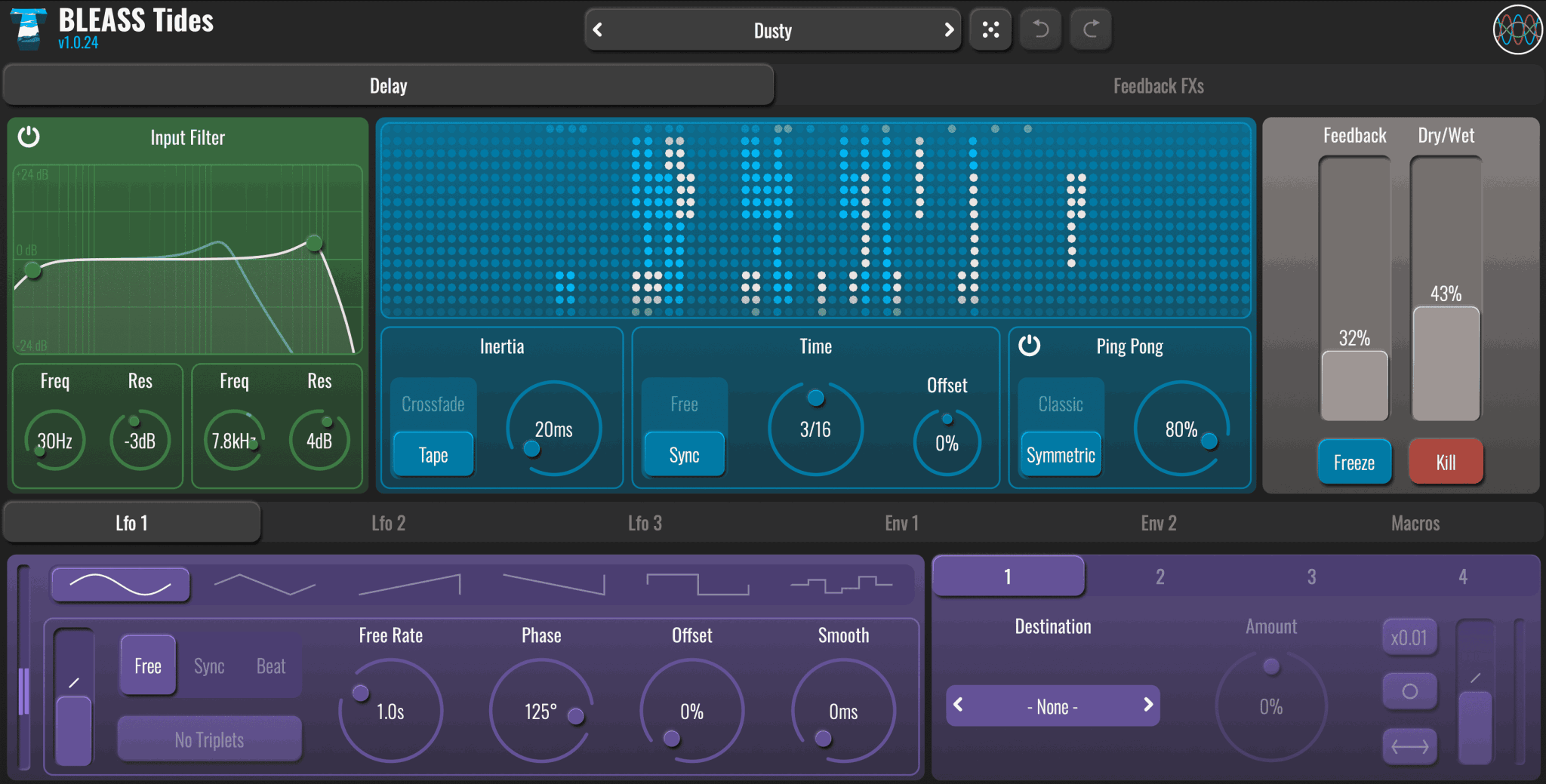
Bleass - BLEASS Tides Plugins & FX Software GUI Artwork

$39.00

Earn 105

Digital Download

0

Instant Access Direct download
100% Genuine Official license
Flexible Payments PayPal, Card or Wallet
Support Here to help
Guaranteed Safe & Secure Checkout
Visa Mastercard American Express Apple Pay Google Pay Klarna

Product Overview

BLEASS Tides washes away the dry, uninspiring echoes of conventional delay processors with wave after wave of richly characterful reflections.

The plugin’s fluid approach to delay processing means delay times can be altered without the unpleasant warping results produced by other delay processors, with the option of a controlled tape-like timing shift, or a simple crossfade between differently timed delays.

Better still, with an enhanced modulation system provided by BLEASS’ latest plugin technology, you can take full advantage of this delay time fluidity with stereo LFOs, envelope followers and macro controllers that allow you to explore new horizons of exciting delay effects.There’s more to creating unique and enthralling delay lines than timing alone, and so BLEASS Tides provides many different ways of shaping and adding character to its repeats.

An input filter combining low- and high-pass resonant bands allows you to easily mould the incoming signal and thereby sculpt the resulting echoes. Then, for even deeper and more exhilarating shaping, Tides’ feedback path features five insert points into which any of 11 different effect processors can be loaded. These include distortions, filters, pitch and frequency shifting, ring modulation, and even an additional delay processor, all of which can be brought to life with the plugin’s stereo modulators.

Tides is the first plugin to use BLEASS’ v2 plugin engine, its reimagined interface design giving a crisp and clean look to the plugin whilst retaining the familiar and welcoming look and feel of previous BLEASS plugins.The new interface is as easy to use with touchscreens as it is with a mouse, and includes innovative interactive elements such as Tides’ delay visualiser that, when clicked with the mouse or touched with a finger, produces fascinating interactive frequency shifting effects. Further realtime interaction comes in the form of momentary Freeze and Kill buttons that are perfect for creating spontaneous, organic effects, whether on stage, on the go, or in the studio.

BLEASS Tides’ unique approach brings delay processing to new shores with never before heard stereo effects and modulations, extensive tonal shaping, and a user interface that’s both easy on the eye and easy to use.

Features

  • ADVANCED STEREO DELAY ENGINE
  • VERSATILE FILTERING FOR TONAL SHAPING
  • INTUITIVE AND INTERACTIVE INTERFACE
  • PRECISION SYNC AND TEMPO CONTROL
  • VERSATILE FEEDBACK PATH WITH 11 PROCESSORS

DELAY TAB

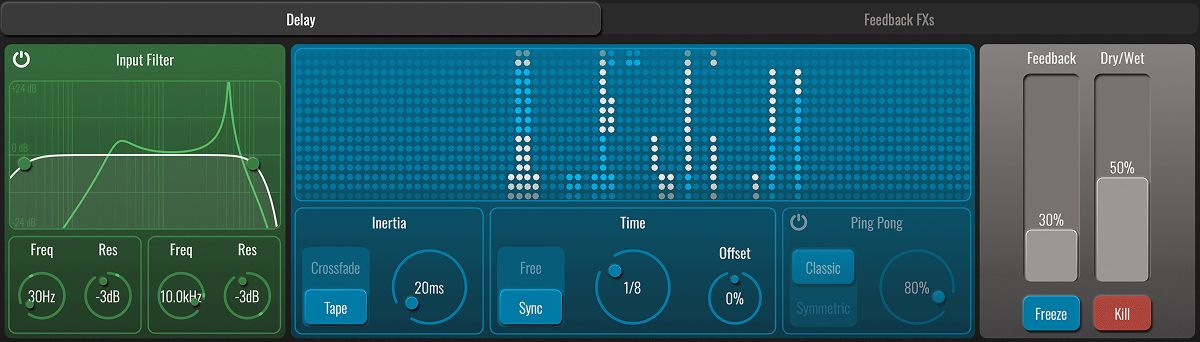
INPUT FILTER

Applies low-pass and high-pass filtering to the input signal. Drag the nodes in the filter graph, or adjust the dials below the graph, to adjust the cutoff frequency and resonance of each band.

TIDES VISUALISATION

This panel provides a lightweight spectral readout of the sounds entering and being produced by BLEASS Tides. The incoming signal’s spectrum is represented by white dots, and repeats are represented by light blue dots.

Touching or clicking on the visualisation activates a frequency shifter within the feedback path (note that this is independent of the optional Frequency Shifter insert processor). 

  • Touching/clicking on the left side of the visualisation produces a negative frequency shift.
  • Touching/clicking on the right side of the visualisation produces a positive frequency shift.
  • The further from the visualisation’s centre that you touch/click, the larger the frequency shift.
  • The frequency shift updates as you drag your finger or mouse across the panel. This means you can interactively adjust the frequency shift in realtime.
  • Remove your finger / release the mouse button to disable the frequency shifter.

INERTIA

Inertia governs the time it takes for any change in delay time to be applied, as well as the way in which the change will be applied.

  • Crossfade applies a volume crossfade between repeats of different lengths when the delay time changes. The Inertia dial determines the length of the crossfade
  • Tape applies a tape-style slow-down or speed-up in response to delay time changes. The Inertia dial determines the rate at which the (virtual) tape speed changes.

TIME

Use the main Time dial to set the desired delay time.

  • In Free mode, the delay time is set in terms of milliseconds and seconds.
  • In Sync mode, the delay time is synchronised to your DAW or host software, and set in terms of note divisions (I.E. 1/4 = crotchet, 1/8 = quaver, etc.).

The Offset dial modifies the selected delay time. This is particularly useful when you want repeats to be synchronised to the beat in a natural, non-robotic way.

PING PONG

When Ping Pong is enabled, successive repeats alternate between two channels, with the stereo spread of those channels controlled by the Ping Pong dial. 

  • In Classic mode, the overall number of repeats created is the same as when Ping Pong is disabled.
  • In Symmetric mode, each channel produces the same number of repeats as when Ping Pong is disabled, resulting in twice the number of repeats overall.

FEEDBACK

Determines how much signal is fed back to the beginning of the delay processor. Higher values result in more repeats being produced. A setting of 100% will repeat indefinitely.

FREEZE

When this momentary button is pressed, the current delay signal is held and repeated, and the incoming signal does not create any new echoes.

KILL

Press this momentary button to instantly mute the delayed signal and reset the delay processor. Once released, delay processing will resume in the normal way.

ENVELOPE FOLLOWER TABS

BLEASS Tides includes two Envelope Follower modulators that produce envelope curves in response to transients in the incoming signal.
 
6Envelope-1_7_11zon

MODULATION METER

Visualises the Envelope Follower’s output.

CURVE FADER

Warps the shape of the Envelope Follower’s attack and release stages. 

  • Has no effect when in the central position. 
  • When in an upper position, accelerates the attack stage and slows the release stage.
  • When in a lower position, slows the attack stage and accelerates the release stage.

GAIN

Controls the sensitivity of the Envelope Follower’s transient detection.

ATTACK

Sets the rate of the envelope’s attack stage.

RELEASE

Sets the rate of the envelope’s release stage.

FEEDBACK FXs TAB

The Feedback tab provides five insert slots for processing BLEASS Tides’ feedback signal. The impact of these processors accumulate across successive repeats.

Click on a slot to open a list of processors, and click the processor name to assign it to the slot. Enable or disable a loaded processor using its power button, and reposition it by simply dragging it to a new slot. Note that only one of each processor can be inserted.
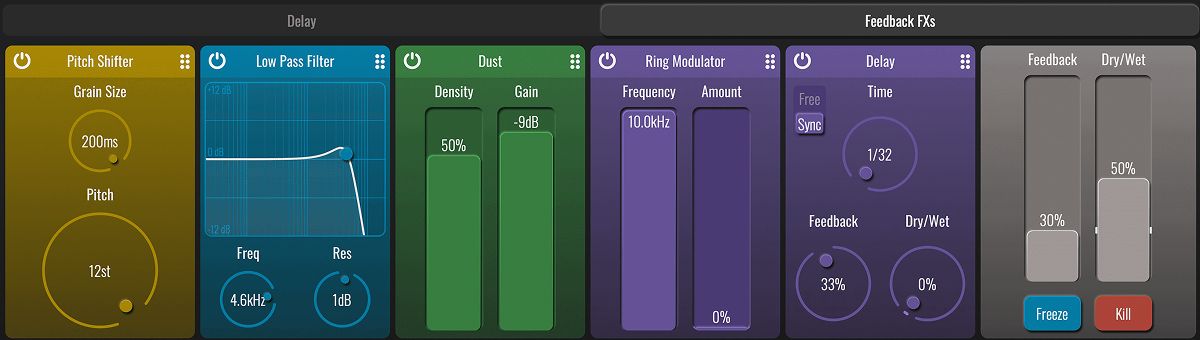
2TIDES-FEEDBACK-FXs-Tab-CROPPED_3_11zon

The available processors are:

DISTORTION

Applies any one of three distortion models. Use the selector at the top of the panel to choose the type of distortion, turning the dial to adjust its strength. 

Be aware that, by boosting the feedback signal’s strength, this processor can cause a runaway feedback loop. The plugin includes a 0dB limiter on the wet signal that will protect your speakers and equipment, but to stop such a loop simply hit the Kill button.

DUST

Adds random digital noise to the feedback signal for a grittier and dirtier sound. Use the Density fader to control the frequency of the noise, and the Gain fader to control its prominence.

BITCRUSH

Simulates the effects of applying sample rate and/or bit-depth reduction. Use the Downsample dial to reduce the sample rate, and the Bit Depth dial to reduce the sample resolution.

FREQUENCY SHIFTER

Applies a frequency-based pitch shift of up-to ±1kHz to the feedback signal.

PITCH SHIFTER

Applies a granular semitone-based pitch adjustment of up-to ±1 octave to the feedback signal. Lower Grain Size settings work best for short and percussive sounds but produce a more processed/less natural sound than longer settings. Use the Pitch dial to set the amount of shift in semitones.

RING MODULATOR

Applies a ring modulation effect to the feedback path. Use the Frequency fader to set the pitch of the carrier (that is, the sound that will be modulated by the feedback signal). The Amount fader controls the overall strength of the effect.

DELAY

Adds a simple secondary delay line within the feedback path. In Sync mode, delay time is set in terms of note length; in Free mode, delay time is set in milliseconds and seconds.
Be aware that this processor can cause a runaway feedback loop that can get louder and louder. If this happens, hit the Kill button to stop the loop.

HIGH PASS FILTER, LOW PASS FILTER, BAND PASS FILTER

Adds filtering to the feedback path. Drag the filter graph’s node, or use the dials, to adjust the filter’s cutoff frequency and resonance.

PEAK FILTER

Adds a peak filter to the feedback path. Drag the filter graph’s node, or use the dials, to adjust cutoff frequency and gain. The Resonance dial controls the bandwidth of the peak curve.

 

LFO TABS

Specifies the waveform that the LFO will use.

MODULATION METER

Visualises the LFO’s output.

CURVE FADER

Warps the shape of the LFO’s waveform. 

  • Has no effect when in the central position. 
  • When in an upper position, slows the LFO waveform’s onset phase and accelerates its falloff phase.
  • When in a lower position, accelerates the LFO waveform’s onset phase, and slows its falloff phase.

SYNC MODE

  • Free uses internal timing for the LFO.
  • Sync synchronises the LFO to the host DAW’s tempo.
  • Beat synchronises the LFO to the host DAW’s tempo and bar position.

NO TRIPLETS

When enabled, any triplet value selected for the LFO Rate (1/3, 1/6 etc.) will be ignored. Not available in Free sync mode.

SYNC RATE

Sets the time taken for the LFO to complete one cycle of its waveform. The Rate is expressed as milliseconds and seconds when in FREE sync mode, otherwise it is expressed in terms of note length.

PHASE

Creates a phase offset between the left and right channels of the LFO.

OFFSET

Creates a global phase offset for the LFO.

SMOOTH

Smooths the rate at which the LFO’s output value changes. This is most useful when used with square, sawtooth and sample-and-hold LFO waveforms.

MACROS TAB

BLEASS Tides features two Macro controllers that allow you modulate up to four parameters simultaneously from a single dial.
 
4MACROS-2_5_11zon


ROUTING PANEL

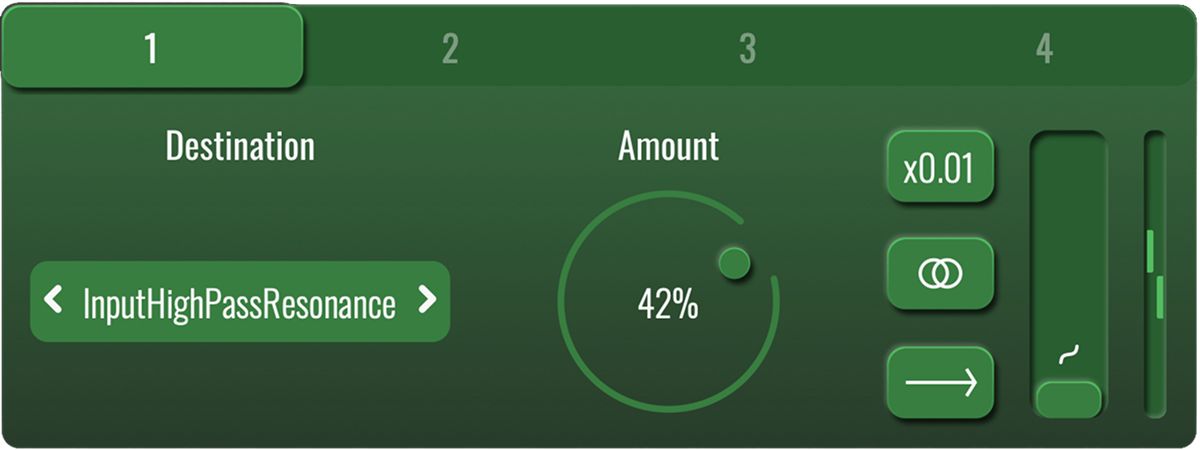
Each of BLEASS Tides’ modulators can be routed to up to four destination parameters. The details of each routing is controlled from a modulator’s routing panel. This panel works identically for each modulator.
 
3routing-panel-1_4_11zon
 
NUMBER BUTTONS

Selects each of the four possible routings for the modulator.

DESTINATION

Specifies the parameter that will be modulated via the routing.

AMOUNT

Determines how strongly the modulator will impact on the destination parameter.

X0.01 BUTTON

Reduces the strength of modulation being sent to the destination by a factor of 100. This makes it easy to create very small fluctuations in the destination parameter’s value.

MONO/STEREO BUTTON

  • In Mono mode (single circle), the modulator’s output is applied equally to both left and right channels. 
  • In Stereo mode (double circle), the left and right values are 180° out of phase with each other. This means that when the left channel’s value is rising the right channel’s value will be falling, and vice versa.

POLARITY BUTTON

  • In Unipolar mode (arrow facing right), the modulation is summed with the destination parameter’s value. When in Stereo mode, the left channel receives a positive value and the right channel receives a negative value (this can of course be reversed by using a negative Amount value).
  • In Bipolar mode (arrow facing in both directions), the modulation fluctuates around the destination parameter’s value.

MODULATION METER

The meter shown on a Routing Panel visualises the actual strength of modulation being sent to the destination parameter, taking into account all of the routing’s settings.

Additional Information

MAC

  • OS X (macOS 10.9 and later (64-bit only) (including intel & silicon processors))
  • Memory: 8 GB
  • Disk: 1 GB
  • Plugins: VST-3, AU, AAX

WINDOWS

  • Windows (Windows 10 or higher)
  • Memory: 8 GB
  • Disk: 1 GB
  • Plugins: VST-3, AAX

Categories:

Delays Reverb Multi Effects

Formats:

Plugin

Genres:

All Genres

Tags:

Plugin

Discover More

View All Events

BROWSE ALL

Happening Now

View Heatwave Sale 2026

SHOP LIVE EVENT
Your Playlist CLEAR
Your playlist is currently empty. Visit a product page and add some tracks to your playlist
Audio Player

0:00
0:00