Sign in to Loot Audio
Access your downloads, purchases and more
Access your downloads, purchases and more

Pulse is a revolutionary new downloader offering blazing fast speeds and powerful control over your libraries. Loot Audio uses Pulse to power some of our downloads and to make managing your libraries more efficient for you.
After your purchase we will send you a unique code (you will also find the code in your account). Use the code with Pulse to power your download and installation. More information about Pulse can be found here.
What are Credits?
You earn Credits every time you purchase a product from Loot Audio. 3% of your order is added to your account in the form of Credits.
Use Credits for money off future orders or convert them to Sample Credits to download samples from the Sounds section of the site.
Unleash A New Dimension In Vocal Creativity
$38.00
Earn 96







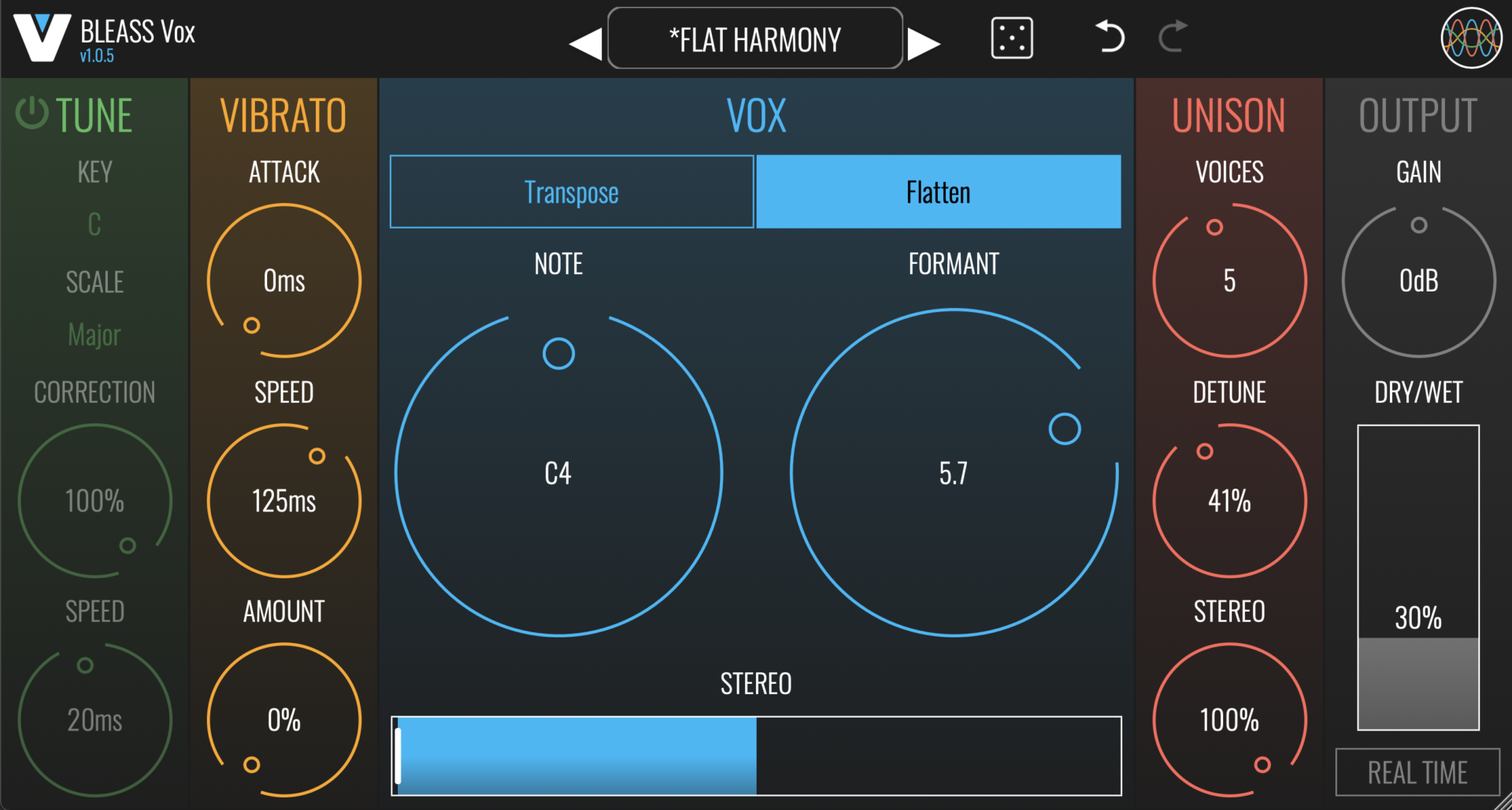
TUNE SECTION
TUNE applies intelligent pitch correction to the voice or sound being processed.
On/Off: Enables and disables the pitch correction processor.
Key: Specifies the musical key that will be used for pitch correction.
Scale: Specifies the musical scale that will be used for pitch correction.
Correction: Determines the strength of the pitch correction. Lower settings will result in smaller pitch changes that don’t reach the corrected pitch. A setting of 100% forces the incoming sound to the exact corrected pitch.
Speed: Determines the time it takes for the incoming sound to come fully into tune when its pitch falls outside of the chosen key and scale. Can be used to create portamento-like effects.
VIBRATO
The VIBRATO stage applies an oscillating pitch modulation to the incoming voice or sound.
Attack: Specifies the time it takes for the vibrato effect to reach full intensity.
Speed: Controls the rate of the pitch oscillation. Smaller values result in faster vibrato effects.
Amount: Controls the magnitude of the pitch oscillation. Higher values result in more pronounced vibrato effects.
VOX
The VOX section is where you configure the plugin’s main pitch adjustment parameters.
Transpose / Flatten: Choose the pitch shifting mode that will be used.
TRANSPOSE: Transposes the signal by ±12 semitones.
FLATTEN: Fixes the output voice’s pitch at a specific note.
Fine: Only available in TRANSPOSE mode. Sets the PITCH dial’s behaviour to continuous, allowing precise adjustments of the pitch.
Pitch: In TRANSPOSE mode, sets the amount of pitch shift that will be applied to incoming notes. In FLATTEN mode, selects the note that the incoming signal will be fixed at.
Formant: Adjusts the harmonics within the signal, thereby modifying its timbre, without impacting the pitch of the root note.
Pitch-Formant Lock (=): Only available in TRANSPOSE mode. Locks together the PITCH and FORMANT dials.
Stereo: Applies a stereo widening effect to the processed voice/sound.
UNISON
The UNISON effect creates detuned copies of the processed voice/sound, creating a thickening effect.
Voices: Determines the number of pitch-shifted unison voices that the plugin will generate. A setting of 1 means the plugin is generating just a single pitch-shifted voice, and so no UNISON effect will be applied. Increasing the setting adds unison voices, thus enabling the UNISON effect.
Detune: Specifies the maximum strength of the detuning effect. The amount of detuning is spread evenly across the unison voices, so only the final unison voice will have the full detuning amount applied to it.
Stereo: Specifies the maximum stereo spread of the unison voices. The unison voices are spread evenly across the resulting stereo field.
OUTPUT
Here you can control the level and mix of the effect.
Gain: Sets the plugin’s master output level. A setting of 0dB means no amplification or attenuation is being applied.
Dry/Wet: Sets the balance between the input voice/sound and the processed signal. At 0%, only the input signal will be heard; at 100% only the processed signal will be heard.
Real Time: When enabled, BLEASS Vox will switch to a more efficient processing model that reduces the latency (I.E. time delay) of signals passing through the plugin, at the expense of processing accuracy. Use this mode during tracking so that the performer can hear the BLEASS Vox effect in their cue mix, then disable REAL TIME during mixing to deliver higher quality results. REAL TIME should also be engaged when using BLEASS Vox during a live performance.
Windows:
Mac:
Format: