🚨 Free product included with qualifying orders 🚨🚨 Free product included with qualifying orders 🚨🚨 Free product included with qualifying orders 🚨🚨 Free product included with qualifying orders 🚨🚨 Free product included with qualifying orders 🚨🚨 Free product included with qualifying orders 🚨🚨 Free product included with qualifying orders 🚨🚨 Free product included with qualifying orders 🚨🚨 Free product included with qualifying orders 🚨🚨 Free product included with qualifying orders 🚨
Change country:
WISHLIST ABOUT BLOG SUPPORT CREDITS SAMPLE CREDITS CONTACT

Forthcoming Events

No forthcoming events scheduled.


Expired Events

Summer Sale Ended: 14 Jul 2026
May 2026 Deals Ended: 31 May 2026

Live Event

Active

Heatwave Sale 2026

Feel The Heat! From industry-leading plugins and Kontakt instruments to essential sample packs and cinematic sound design libraries.

Ends In
39d 20h 05m 02s
VIEW ALL DEALS

0

0

Change country:

We use cookies

We and selected 3rd parties use cookies or similar technologies as specified in our Cookie Policy

You can consent to the use of such technologies by using the "Accept" button

Manage cookies

Essential
Essential cookies required for business process and to make the website usable by enabling basic functions. (always active)
Marketing
Marketing cookies are used to serve personalised ads and analyse performance.

Plugin

Plugin Effects

NUGEN Audio

Stereoplacer

$145.15

Earn 327

Stereoplacer
Stereoplacer
Stereoplacer

Frequency-dependent Panning Tool

0

Plugin

Plugin Effects

NUGEN Audio

Stereoplacer

$145.15

Earn 327

Frequency-dependent Panning Tool

0

Adjust the position of percussion parts in a stereo mix with this frequency-dependent panning tool. Pan control for the 21st century Stereoplacer is an advanced fine-tune parametric balancing control. You can tune each band into specific frequencies and move the frequency content around in the stereo sound stage. Just choose the position you want, and let Stereoplacer take care of preserving the balance of the original sounds. Choose the frequencies you want to fix and move them anywhere, leaving the rest of the stereo image intact. Make improvements in any area of the sound stage without causing problems elsewhere. Stereoplacer gives you precise control you just can’t get within a traditional mix setup. Enhance recordings Focus in on the frequencies you want to move using the intuitive solo controls and then tweak/fix/align them in the stereo panorama without affecting any other regions - simple, quick and effective! Fix poor recordings Ideal for restoration Reposition complex audio Reconstruct mono image Dynamic visual feedback Harmonic capture For mixing and sound design Use Stereoplacer for panning sounds without affecting their low end, fixing poor microphone placement and moving problem frequencies as an alternative to EQ. Adjust the position of sounds in sample loops and gain detailed control of harmonically complex sounds, tackling problems introduced by heavy processing. All with superb mono-compatibility. For post production and restoration Re-position specific elements or achieve gentle linear phase adjustment of your entire mix. Extrapolate and re-balance poorly positioned instruments whilst leaving the rest of the soundfield intact. You can even add stereo detail to previously mono recordings, leaving the original character intact. Presets Setting up Stereoplacer is rather like setting up an EQ and is almost entirely dependent upon the source audio. As a result, there are no factory presets installed by default. However, there is scope to create custom presets for users who are repeatedly encountering similar mix problems. Typical applications Panning sounds in sample loops Fixing poor microphone placement Shifting problem frequencies Double tracking stereo distribution Extrapolating poorly panned sounds

Product Overview

Adjust the position of percussion parts in a stereo mix with this frequency-dependent panning tool.

Pan control for the 21st century

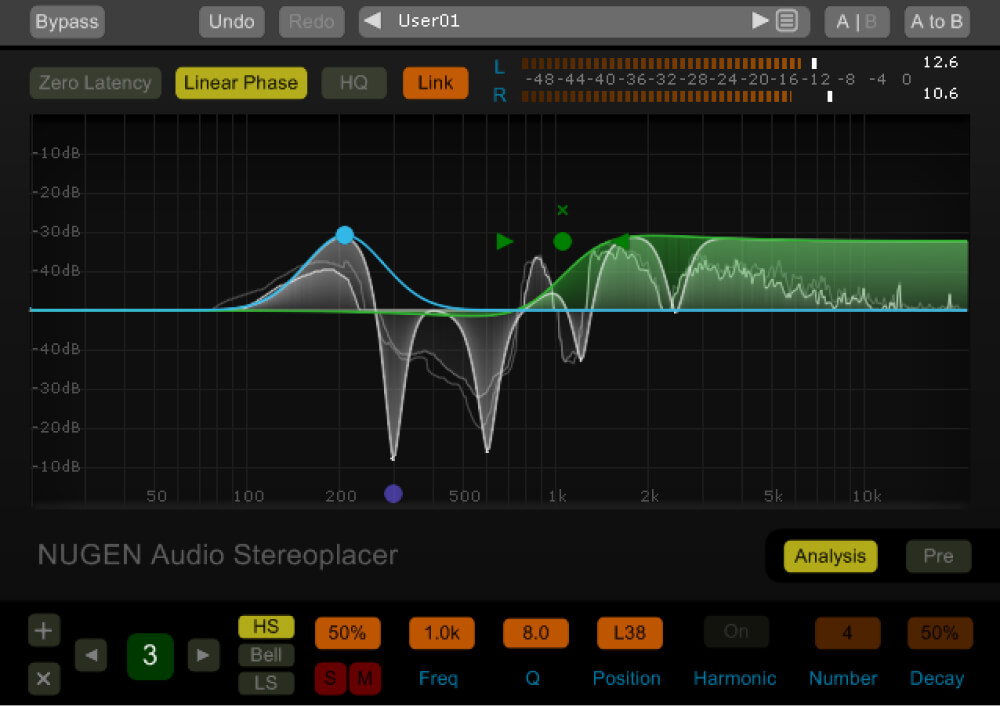
Stereoplacer is an advanced fine-tune parametric balancing control. You can tune each band into specific frequencies and move the frequency content around in the stereo sound stage. Just choose the position you want, and let Stereoplacer take care of preserving the balance of the original sounds.

Choose the frequencies you want to fix and move them anywhere, leaving the rest of the stereo image intact. Make improvements in any area of the sound stage without causing problems elsewhere. Stereoplacer gives you precise control you just can’t get within a traditional mix setup.

Enhance recordings

Focus in on the frequencies you want to move using the intuitive solo controls and then tweak/fix/align them in the stereo panorama without affecting any other regions - simple, quick and effective!

  • Fix poor recordings
  • Ideal for restoration
  • Reposition complex audio
  • Reconstruct mono image
  • Dynamic visual feedback
  • Harmonic capture

For mixing and sound design

Use Stereoplacer for panning sounds without affecting their low end, fixing poor microphone placement and moving problem frequencies as an alternative to EQ. Adjust the position of sounds in sample loops and gain detailed control of harmonically complex sounds, tackling problems introduced by heavy processing. All with superb mono-compatibility.

For post production and restoration

Re-position specific elements or achieve gentle linear phase adjustment of your entire mix. Extrapolate and re-balance poorly positioned instruments whilst leaving the rest of the soundfield intact. You can even add stereo detail to previously mono recordings, leaving the original character intact.

Presets

Setting up Stereoplacer is rather like setting up an EQ and is almost entirely dependent upon the source audio. As a result, there are no factory presets installed by default. However, there is scope to create custom presets for users who are repeatedly encountering similar mix problems.

Typical applications

  • Panning sounds in sample loops
  • Fixing poor microphone placement
  • Shifting problem frequencies
  • Double tracking stereo distribution
  • Extrapolating poorly panned sounds

Flexible controls

With fully adjustable curves (bell, high and low shelving and even additional linked-harmonic overtones) you can redistribute stereo information with subtlety, or make powerful corrections – even moving hard-panned frequencies from one side to the other – without affecting the overall level balance of the material.

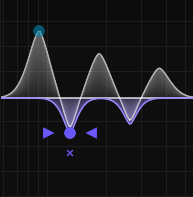
With each node it is possible to add a number of additional harmonically linked bell curves, all referenced from the one ‘root’ control point.

'Panning' the bass

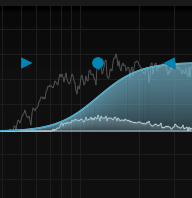
Sometimes a mix calls for a bass element, say the bass guitar track, to be panned away from the centre. Often this is best avoided as off-centre high energy in the low frequencies can create more problems than it resolves. Using Stereoplacer, however, the low frequencies can be kept in the centre whilst higher frequencies (i.e. the attack component) are moved across the stereo field with a shelving band. This gives the impression that the bass part has been panned, when really only the high, directional frequencies have been affected.

You can also achieve the opposite effect, pulling stray low frequencies back into the centre without affecting the entire sound.

Additional Information

Available formats

  • We support AAX, VST3, AU and AudioSuite in 64-bit.

NUGEN Audio is in the process of phasing out some older plug-in formats. Our most recently updated products no longer support 32-bit or RTAS/VST2. Customers who still wish to use these formats can download a legacy installer from the Build Archive.

Minimum system requirements

  • Mac OSX 10.9 / 512 MB RAM
  • Windows 7 / 512 MB RAM
 

Categories:

VST | AU | Plugins Mastering Sound Design Panning

Formats:

Plugin Software

Genres:

All Genres

Tags:

Effects Plugin Sound Design

Discover More

View All Events

BROWSE ALL

Happening Now

View Heatwave Sale 2026

SHOP LIVE EVENT
Your Playlist CLEAR
Your playlist is currently empty. Visit a product page and add some tracks to your playlist
Audio Player

0:00
0:00