Sign in to Loot Audio
Access your downloads, purchases and more
Access your downloads, purchases and more

Pulse is a revolutionary new downloader offering blazing fast speeds and powerful control over your libraries. Loot Audio uses Pulse to power some of our downloads and to make managing your libraries more efficient for you.
After your purchase we will send you a unique code (you will also find the code in your account). Use the code with Pulse to power your download and installation. More information about Pulse can be found here.
What are Credits?
You earn Credits every time you purchase a product from Loot Audio. 3% of your order is added to your account in the form of Credits.
Use Credits for money off future orders or convert them to Sample Credits to download samples from the Sounds section of the site.
Mixing: Magnified


$39.90
Earn 108







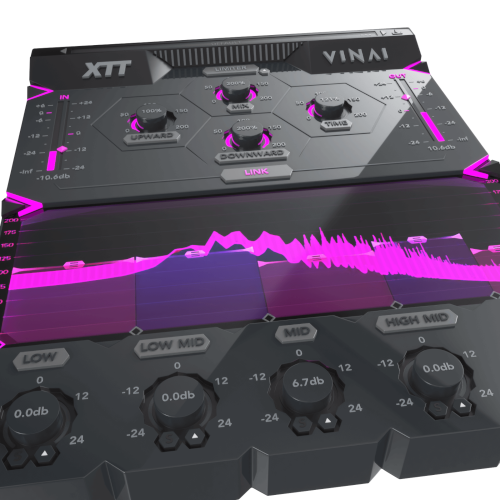
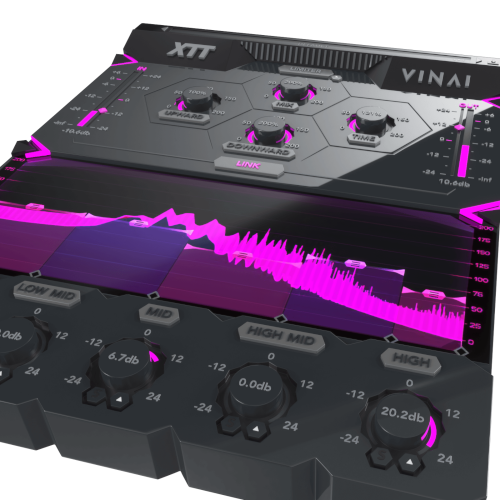
The 5-band compressor passes your audio through low, low-mid, mid, mid-high and high bands, all with adjustable crossovers. Each band has its own tweakable threshold level and make-up gain dial. These settings give an unparalleled level of control to your compressed signal. Intuitively drag the threshold levels and frequency crossover points to shape your sound, all whilst watching the real-time frequency analyser display the results of your adjustments.
SURGICAL SHAPING
Each of the 5 bands has an optional surgical shaping section to control the specifics for that particular band. Solo it, mute it, adjust the RMS, the Attack and Release or tilt the Mid / Side information.
UPWARD & DOWNWARD COMPRESSION
With independent controls, upward and downward compression can be dialled in simultaneously - up to 200%. This allows for sound-shaping fixes, such as balancing vocal levels or clamping down on drum transients whilst simultaneously bringing up the level of the room ambience. Using these two types of compression also offers up creative possibilities, emphasising the splashy explosiveness of transients or creating room tone out of thin air.
TIME
For a quick and easy way to scale up the attack and release times of all of the 5 different bands, use the Time dial. This applies timing changes across the board, useful for previewing what might happen with the more surgical per-band attack and release settings.
No need to use a third party limiter as XTT’s built in Brickwall Limiter adds unique saturation to the signal, without introducing unwanted distortion. It’s transparent behaviour can be dialled in with an adjustable Boost setting, to ensure that your outgoing audio is as punchy and loud as possible without sacrificing the fidelity of the sound.
LINKED IN & OUT FADERS
Gain staging is a really important factor in effective plugin processing. With that in mind, the Input and Output faders can be linked, so that you can tame the signal going into XTT whilst simultaneously keeping control of the output volume. The meters allow accurate visualization of the incoming and outgoing signal whilst you finesse your settings. Keeping a close eye on the meters whilst you tweak your compression values makes it easy to preserve the theoretical loudness of the sound.
BYPASS & MASTER MIX
The bypass control is smoothed to be as click and pop free as possible for unhindered A/B testing. Choose to mix the compressed signal with your original raw audio via the central Mix ratio control, allowing you to dial down the compression ratio for parallel effects.
VISUAL FEEDBACK
The real-time frequency display shows exactly what’s happening to the signal as it travels through each stage of the compressor in real time. This allows for accurate monitoring for each of the 5 bands and at every step of the signal chain.
PRESETS
With many included presets, it’s easy to find the perfect starting point for your own compression adventures. All with distinct uses and expertly-designed settings, these presets can be used on all sorts of different audio to instantly preview a wide range of creative effects. They include everything from subtle shaping to more full-on saturated compression. And of course, you can save your own settings too.
“We’ve always been passionate about enhancing our mixing techniques and sound processing and this plugin is the result of years of tests with audio processing chains that we’ve been using on our own productions.
One of the most important and underrated things in music mixing and production is gain staging. XTT really understands and helps to explain the importance of that process.
Since pretty much every DAW is now hybrid in operation, producers often make this one common mistake; forgetting to control the gain staging before sending audio to a VST.
Most producers think everything is fine as long as you don’t clip your master channel, but that’s not the case. Let’s say that your first VST output is at -1dB, and then processed through a saturator and clipping at +5dB. If you apply a master channel reduction of -5dB to compensate you might assume everything is fine as there’s no clipping. But that’s the wrong approach, as you haven’t gain staged the correct input level to allow the plugin itself to properly process the sound in the most effective way.
There’s a further problem; when you download a new preset pack or expansion you’ll notice that the trend is to give the user a very loud output to make the plugin seem more impressive. If you know how to handle this volume then that’s great but most people don’t trim the audio level before entering into the next plugin on their chain. That means that the plugin isn’t working as intended because the signal it’s receiving is already too hot.
With XTT we solved this issue by visualizing the input volume of the source. You are then able to trim the level to your preference and with a unique feature, you can ‘Link’ the input and output gain compensation, preserving the quality and character of the sound.”
Windows 8 and later (32/64bit)
MacOS 10.15 and later
AAX - ProTools 11 or higher