🚨 Free product included with qualifying orders πŸš¨β˜…πŸš¨ Free product included with qualifying orders πŸš¨β˜…πŸš¨ Free product included with qualifying orders πŸš¨β˜…πŸš¨ Free product included with qualifying orders πŸš¨β˜…πŸš¨ Free product included with qualifying orders πŸš¨β˜…πŸš¨ Free product included with qualifying orders πŸš¨β˜…πŸš¨ Free product included with qualifying orders πŸš¨β˜…πŸš¨ Free product included with qualifying orders πŸš¨β˜…πŸš¨ Free product included with qualifying orders πŸš¨β˜…πŸš¨ Free product included with qualifying orders πŸš¨β˜…
Theme

Forthcoming Events

No forthcoming events scheduled.


Expired Events

Summer Sale Ended: 14 Jul 2026
May 2026 Deals Ended: 31 May 2026

Live Event

Active

Heatwave Sale 2026

Feel The Heat! From industry-leading plugins and Kontakt instruments to essential sample packs and cinematic sound design libraries.

Ends In
17d 17h 59m 02s
VIEW ALL DEALS

0

0

Change country:

We use cookies

We and selected 3rd parties use cookies or similar technologies as specified in our Cookie Policy

You can consent to the use of such technologies by using the "Accept" button

Manage cookies

Essential
Essential cookies required for business process and to make the website usable by enabling basic functions. (always active)
Marketing
Marketing cookies are used to serve personalised ads and analyse performance.

Resona is aimed at cinematic Ambient and/or Horror music.
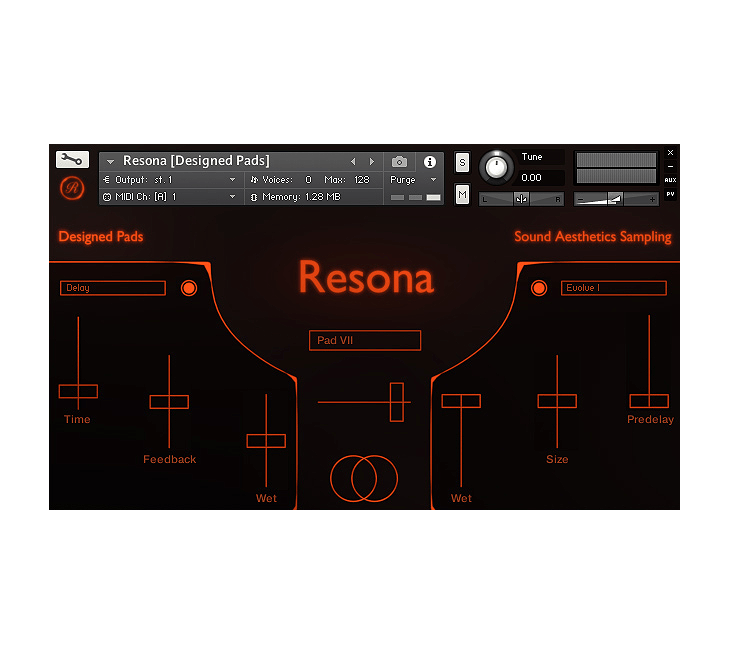
Sound Aesthetics Sampling - Resona Kontakt Instruments Software GUI Artwork

$33.83

Earn 75

Digital Download

0

Note: This product is compatible with Kontakt Full 5.5.2 and above

4.5
Instant Access Direct download
100% Genuine Official license
Flexible Payments PayPal, Card or Wallet
Support Here to help
Guaranteed Safe & Secure Checkout
Visa Mastercard American Express Apple Pay Google Pay Klarna

Product Overview

Resona is an essential toolkit for Ambient, Horror and cinematic music in general. The library includes Bells, Glass, Mallets, Ambiences, Arps, a huge diversity of Pads and many more. As a bonus you even get the possibility to implement your own samples if you’d like to.

Core of the Library

The Intention of this library was to sample two small music boxes, which you hear in the “Melodies” patches. After it worked out well I decided to include more Bell and/ or Mallet like sounds and fill the sound space behind them with Pads and Ambiences. So I crafted the Pads and Ambiences from Synths, real instrument recordings and a hybrid version of both to give the whole library a lot more depth. You don’t get a huge array of patches, because you don’t need to. You can simply select the sound of your choice and don’t have to click through all the patches.

The Multis are just some combinations, that came into my mind, but the possibilities are nearly endless. Feel free to create your own. And because every patch has a individual Volume slider, you can even morph between two or more sounds on the fly. (Using the default CC7 would just rise the Volume of all instruments currently loaded into the rack)

The Sounds were meant for instant inspiration so you can just play them right out of the box or take your time and tweak the sound until they fit your taste.

Key Features

  • 24 Instrument Patches (.nki)
  • 13 Multis (.nkm)
  • 279 samples in 24 bit / 48 khz, ncw compressed
  • Some Sounds got up to 5 dynamic layers (Glasses, Mallets etc.)
  • 27 custom Impulse Responses
  • Sampled Instruments: Small Music Box, Bells, Wine Glass played with different mallets, Kalimba, Marimba, Strings, Voices, Woodwinds, Synths.
  • Essential effects like: Delay, Reverb, Lofi, Phaser, Chorus.
  • Volume slider for each instrument to easily morph between the patches via midi CC automation.
  • The Patches labeled “Sampler Mode” use a randomization technique, which makes the sound more organic, but also uses more RAM.
  • An Arpeggiator has been programmed for the Arps patches.
  • Most Patches got a low pass filter mapped to Mod Wheel.

Patch Creator

The Patch Creator gives you the ability to use your own samples and take advantage of the GUI. I’ll explain how to use it.

  • First we have to resave a plane Patch Creator patch. So decide if you want to create it in Sampler Mode or DFD. [Again: Sampler Mode sounds more natural, but DFD is lower on system ressources]
  • Load the Patch out of the “Patch Creator” folder.
  • Click on the wrench in the left top of the instrument and then onto the icon “Files” next to options.
  • Now click “save edited instrument […] as” and type in the name you want to give your instrument. Be sure to keep “patch + samples” checked. (If you accidentally overwrite the plane Patch, don’t worry, you have a copy of it within the “Patch Creator[Backup]” folder) * After that exit Kontakt and open up the sample folder of your new instrument. * Now you can simply exchange the placeholders with your custom samples. You only have to keep the naming. For example: “resona_custom_001”. * If you open up your Patch you can additionally set Root Key, Fine Tune, Attack and Decay for each of the five samples individually. [A Root Key Chart is included if you’re not familiar with midi numbers] Done! [You can repeat this as often as you want to]

Reviews

4.5/5.0

(Average of 18 reviews)

Sort By:

Array

Additional Information

Categories:

Tension Sound Design Pads

Formats:

Kontakt

Tags:

Kontakt

Discover More

View All Events

BROWSE ALL

Happening Now

View Heatwave Sale 2026

SHOP LIVE EVENT
Your Playlist CLEAR
Your playlist is currently empty. Visit a product page and add some tracks to your playlist
Audio Player

0:00
0:00