🚨 Free product included with qualifying orders 🚨🚨 Free product included with qualifying orders 🚨🚨 Free product included with qualifying orders 🚨🚨 Free product included with qualifying orders 🚨🚨 Free product included with qualifying orders 🚨🚨 Free product included with qualifying orders 🚨🚨 Free product included with qualifying orders 🚨🚨 Free product included with qualifying orders 🚨🚨 Free product included with qualifying orders 🚨🚨 Free product included with qualifying orders 🚨
Theme

Forthcoming Events

No forthcoming events scheduled.


Expired Events

Summer Sale Ended: 14 Jul 2026
May 2026 Deals Ended: 31 May 2026

Live Event

Active

Heatwave Sale 2026

Feel The Heat! From industry-leading plugins and Kontakt instruments to essential sample packs and cinematic sound design libraries.

Ends In
17d 20h 54m 33s
VIEW ALL DEALS

0

0

Change country:

We use cookies

We and selected 3rd parties use cookies or similar technologies as specified in our Cookie Policy

You can consent to the use of such technologies by using the "Accept" button

Manage cookies

Essential
Essential cookies required for business process and to make the website usable by enabling basic functions. (always active)
Marketing
Marketing cookies are used to serve personalised ads and analyse performance.

Plugin

Software

Hit'n'Mix

RipX DAW

Your Creative Companion

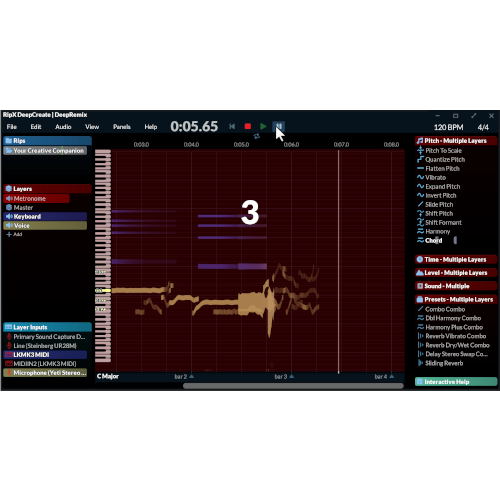
Hit'n'Mix - RipX DAW Plugins & FX Software GUI Artwork
Hit'n'Mix - RipX DAW Screenshot 2
SAVE 25%
ENDS IN:

01

d

:

08

h

:

55

m

:

32

s

$83.71

$111.62

Earn 186

Digital Download

0

Instant Access Direct download
100% Genuine Official license
Flexible Payments PayPal, Card or Wallet
Support Here to help
Guaranteed Safe & Secure Checkout
Visa Mastercard American Express Apple Pay Google Pay Klarna

Product Overview

RipX DAW includes the world’s leading audio separation and in-the-mix note & chord editor technology.

It’s possible to break down and customize output from AI Music Generators with integrated access to a leading service.

Additionally, record using a MIDI/MPE/laptop keyboard, or microphone/audio input, laying down sounds extracted from existing audio, or the built-in library.

A wide range of single-click automated effects are included, allowing for plenty of experimentation.

Note: You are looking at RipX DAW - If you want the PRO version please see here: https://www.lootaudio.com/category/plugins/HitnMix/ripx-daw-pro

Features

  • Effortlessly record MIDI/MPE and audio into RipX - create a Layer, then select your device from the Inputs Panel and press the red record button. Add to existing ripped audio, or start from scratch! 
  • Get creative with samples, instruments and other sounds - draw in, drop on, or apply to existing audio. Even swap any sound for another, like a vocal line for a guitar riff!
  • Blend instruments and sounds together – and create new instruments and sounds! The level of each blended instrument can be adjusted over time - for example, make it start with a Bass drum attack and fade into a sub-bass. Then apply to all existing bass notes.
  • Easily re-perform and re-sequence Layers - replace your song layers with new parts. Add any audio from existing recordings as new sounds and map to MIDI/MPE controllers and keys for re-recording.
  • Experiment with a wide range of dynamic and creative audio effects - apply after recording, or control effects via MIDI in real-time: Turn a knob to apply pitch correction to your voice or tweak modulation with your hands using MPE, for the ultimate in expressive output.
  • Find your unique sound by constructing effect and sound combos - drag and drop your choice of effects and samples onto each other and get deep and dirty with your creativity.
  • Color coded automation lanes - apply to notes, groups of notes, and time regions. Easily control all effect and sound levels over time.
  • Rip VST3 instruments - rip and store any VST3 preset in the Sound Panel, ready to record with.
  • View note names on the piano roll - see the notes as the playhead moves through each key. Great for analyzing existing performances!
  • Keep your ideas when not recording - stored as Practice Clips in case you forget to press record when in a creative flow-state!
  • Customizable UI and panels - adjustable panels which can be opened, collapsed or repositioned to the left- or right- hand side of the screen.
  • Includes hand-picked instruments, percussion, SFX and loops - get started with these sounds, available from the Sound Panel.
  • Seamlessly connect to your existing DAW - with the included VST/ARA and AAX plug-ins.

RECENTLY ADDED

  • Computer Keyboard recording input
  • Step Time entry
  • Quick Panel for commonly used and favourite effects, plus Search box for effects and sounds
  • Chorus, Saturation and Flanger effects with improved Compression
  • Integrated AI Music Generator access
  • Improved sound replacement
  • Click layer for audible beat alignment
  • Highly functional note/percussion groups with snap-to original beat markers
  • One click effect and sound application
  • Automatic panel expanding to show currently applied effects 
  • Automation lane selectors to show what effects and sounds are applied where and to what layers
  • Significantly faster ripping 
  • PRO version: EQ Panel and DeEsser
  • Many recording and playback improvements, including automatic grouping of new recordings for easy editing and fast application of effects with automation
  • Sound, Loop and Rip Layer auditioning plus click and drag insertion
  • A multitude of user interface and editing tweaks for a more intuitive and smoother experience

OVERVIEW

Hit

Hit’n’Mix reveals the next evolutionary stage of its multiple award-winning RipX software. Now matured into a fully-fledged DAW available as standard and Pro versions, RipX DAW is the first of its kind to provide a truly holistic approach to cutting-edge AI music production processes. From AI generated music access and refinement, to stem separation, to instrument replacement, this update also includes over 100 workflow enhancements.
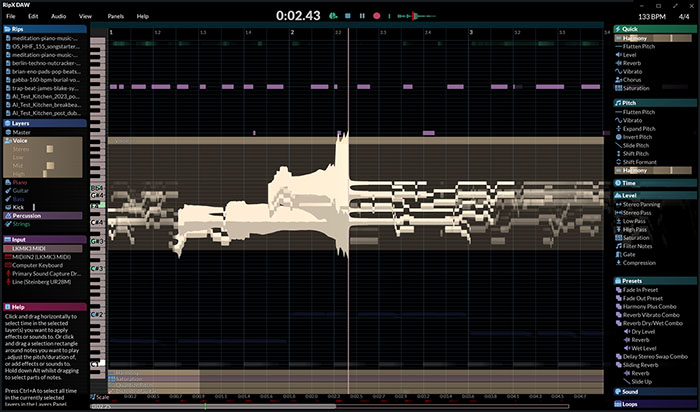
RipXDAWSTDScreenShot

Riley Knapp, platinum selling songwriter & producer explains “The output of most AI Music Generators is robotic, chaotic and usually unlistenable. This is due to the fact AI 'samples' contain elements that are out of key, out of time and don't follow any musical structure. With RipX DAW, I am able to separate each sound within a generation, re-pitch and fine tune any elements, create a musical structure out of it and replace any subpar sounds with high quality sounds. RipX DAW's unique 'Edit-in-Mix' workflow makes it possible to humanize AI Music.”

The first and only DAW to treat audio and MIDI ‘as one’, RipX DAW replaces existing RipX DeepRemix, DeepCreate and DeepAudio modules with a streamlined offering of one standard and one Pro version. Built around the revolutionary Rip Audio format, it makes child’s play of in-the-mix editing in ways that are not possible with waveform and MIDI based software. RipX DAW is tailor-made for every kind of music and audio creative, with special emphasis on the new generation of AI-inspired content creators.

  • RipX DAW includes the world’s leading audio separation and in-the-mix note & chord editor technology. It’s possible to break down and customize output from AI Music Generators with integrated access to a leading service. Additionally, record using a MIDI/MPE/laptop keyboard, or microphone/audio input, laying down sounds extracted from existing audio, or the built-in library. A wide range of single-click automated effects are included, allowing for plenty of experimentation.
  • RipX DAW PRO includes all of the features and functionality of the RipX DAW, then adds advanced stem and AI Music Generator clean-up, Audioshop sound manipulation tools, and pro DAW features to the workflow. Tweak sounds at the harmonic level, draw in guitar slides and vocal embellishments, and edit noise and unpitched sound without affecting the melody. Python scripting is included for complete programmatic control over audio.

rip-x-daw-logo

MAIN FEATURES

  • MIDI and audio ‘as one’ - no separate audio and MIDI tracks. Once MIDI and audio are inside RipX they are in Rip Audio format, and all features including editing and effects can be applied, no matter what.
  • 6+ tracks of stem/instrument separation each of which can be independently muted, soloed, extracted and adjusted.
  • Further separation of stems/instruments into fully editable notes, chords and unpitched sounds.
  • The ability to customize, clean-up, transform and rearrange ideas directly from AI Music Generators.
  • Sound blending and substitution - blend and replace instruments and sounds with different instruments and sounds to adapt and be creative with performances.
  • The world’s first audio separation sampler – rip your song into layers, add sounds from them to the Sounds Panel, then re-perform with a controller into a new or existing layer.
  • Advanced remixing capabilities even within ‘fixed’ stereo audio files.
  • Note and chord recognition to help musicians learn parts to songs.
  • A user-friendly, note-based interface - for transparent pitch/time-based editing and effects, with instant visual feedback.
  • Colour-coded notes and Layers used throughout to enable a clearer understanding of the music and applied effects. 
  • The ability to apply/randomize scales and keys of newly separated stems, all in one app.
  • One-click effects, sound replacement and Combo Effects - quick and easy to set-up, tweak and combine, versus stock DAW plugins and chained plugins.
  • Ripping of favorite VST3 instruments - to re-perform and manipulate in any way imaginable.
  • Unprecedented control over notes, harmonics, noise and unpitched sound using Audioshop tools, the Harmonic Editor, Repair Panel and RipScript Python scripting. 
  • The ability to import your own background images to set the mood - supported by very few DAWs. 

Additional Information

- macOS 10.12+ (2011 & later models, including M1) / Windows 7/8/10/11 (64-bit)
- Minimum: 2 Core 2.5GHz CPU, 8 GB RAM, 20 GB Free Disc Space
- Recommended: 4+ Core CPU / Apple Silicon M1/M2, 16+ GB RAM, 20 GB Free Disc Space
- For Much Faster Ripping Speeds on Windows: NVIDIA GeForce 1070/1080/1080 Ti/2070/2080/2080 Ti/3070/3080/3090 with 16 GB RAM and NVIDIA CUDA Toolkit 11.0 installed (free download)
- RipLink AudioSuite plug-in requires Pro Tools 12.8.2 (macOS) / 12.2 (Windows) or later.
- RipLink VST3/ARA plug-in requires Studio One 4, Cubase/Nuendo 11.0.30, Reaper 5.97, Cakewalk 2019.05 or later.
- RipX DeepCreate is included for free with existing RipX DeepAudio licenses.
- RipX DeepCreate is a paid update for existing RipX DeepRemix customers.

Categories:

Software

Formats:

Software

Genres:

All Genres

Tags:

Audio Software

Changelog

V7.5

06/12/25

  • Over 100 enhancements, including:
    • Significantly improved ripping and music detection for smoother, more detailed separation.
    • Enhanced note splitting, instrument, drum, sibilance, and chord recognition.
    • More accurate audio to MIDI export.
    • Better-sounding instrument replacement.
    • Faster recording latency with visual pitch aids.
    • Automation lanes with draggable handles.
    • Numerous other editing and UI improvements for a more enjoyable and intuitive experience.

V8.1

06/12/25

  • Windows: Fixed problem with Audioshop not updating correctly, showing an error at startup.
  • Windows: Fixed problem with installer whereby it removed an essential product file from an existing 7.5.1 installation
  • Windows: Fixed CUDA checks for suitable hardware
  • Mac: Fixed ripping on Intel Macs
  • Fixed problem with MIDI export where it could take an excessively long time
  • When tapping a layer in Layers Panel when several are selected, now selects that one only
  • Now correctly removes all notes belonging to a layer when multiple Layers are deleted
  • Fixed a potential issue where a note might not get highlighted when mouse is hovered over it
  • Prevented practice clips being overlaid over the main rip being edited, when the rip was loaded from external source

Discover More

View All Events

BROWSE ALL

Happening Now

View Heatwave Sale 2026

SHOP LIVE EVENT
Your Playlist CLEAR
Your playlist is currently empty. Visit a product page and add some tracks to your playlist
Audio Player

0:00
0:00