Sign in to Loot Audio
Access your downloads, purchases and more
Access your downloads, purchases and more

Pulse is a revolutionary new downloader offering blazing fast speeds and powerful control over your libraries. Loot Audio uses Pulse to power some of our downloads and to make managing your libraries more efficient for you.
After your purchase we will send you a unique code (you will also find the code in your account). Use the code with Pulse to power your download and installation. More information about Pulse can be found here.
What are Credits?
You earn Credits every time you purchase a product from Loot Audio. 3% of your order is added to your account in the form of Credits.
Use Credits for money off future orders or convert them to Sample Credits to download samples from the Sounds section of the site.
Next-generation music production and performance. Create without limits.


$393.00
Earn 1017







Bitwig’s Sampler now offers slicing in all play modes. Clicking the Sliced icon instantly converts a sample into slices that can be triggered from a MIDI controller or the piano roll. Clips can also be sliced from the Arranger or Launcher directly into a Sampler.
Slices can be distributed across a sample in equal divisions or at beat intervals. They can also be placed at onsets (good for rhythmic material) or at pitch changes (using Sampler’s new automatic pitch detection). Whatever the mode, all slices can be manually adjusted, created, and deleted with a click or two.
Once sliced, a sample is split into chunks that are triggered by an input. Slices can be triggered via notes (all notes, or just the white/black keys on a keyboard). Alternatively, they can be targeted with the Select control for manual exploration (or for control via automation or modulation) – or via note velocity, for new expressive options.
Additional features give slicing in Bitwig’s Sampler unique creative potential. Per-slice looping can be used to create complex bouncing textures and granular layers. And per-slice modulation means that any parameter in Sampler (or nested devices) can behave differently for each slice, blurring the lines between a sampler and a step sequencer.
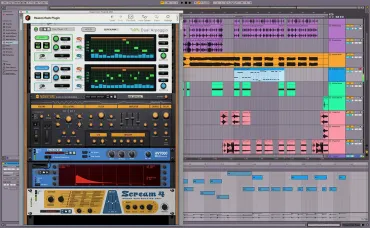
Bitwig Studio devices are virtual instruments, audio effects, and other tools for crafting your sound. The extensive array of included devices covers all sound design needs, from the subtle to the extreme.
Bitwig Studio includes instruments and effects such as:
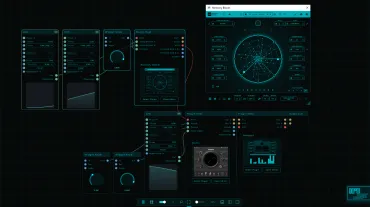
The Grid: an open modular sound design environment that powers a family of devices. It includes 230+ modules and a supersonic workflow.
A full creative library right out of the box: Thousands of sounds and factory presets, including drum machines, acoustic drums, multi-sampled instruments, instrument loops, sound effects, and various synth presets, as well as curated partner and artist packages.
5.0/5.0
(Average of 1 review)
Sort By:
26 GB free disk space required (for full content installation). Minimum 4 GB RAM (8 GB recommended). 64-bit OS: PC Windows 10 or later. Mac macOS 12 or later (Intel or Apple Silicon). Linux Ubuntu 24.04 or later. For latest system requirements and OS compatibility, please see our website at bitwig.com.
All Bitwig Studio software updates in the following 12 months are FREE.
V5.1
20/06/26