Theme

Forthcoming Events

No forthcoming events scheduled.


Expired Events

October Deals Ended: 31 Oct 2026
6th Birthday Sale Ended: 08 Oct 2026

Live Event

Active

Black Friday 2026

Our biggest sale of the year. Scoring for film, designing next-generation sounds, or mixing your next release? Explore deep discounts across thousands of premium plugins, virtual instruments, and sample libraries.

Ends In
10d 05h 57m 36s
VIEW ALL DEALS

0

0

Change country:

We use cookies

We and selected 3rd parties use cookies or similar technologies as specified in our Cookie Policy

You can consent to the use of such technologies by using the "Accept" button

Manage cookies

Essential
Essential cookies required for business process and to make the website usable by enabling basic functions. (always active)
Marketing
Marketing cookies are used to serve personalised ads and analyse performance.

Plugin

Plugin Effects

Software

Deliver the best listening experience and release your music with confidence.

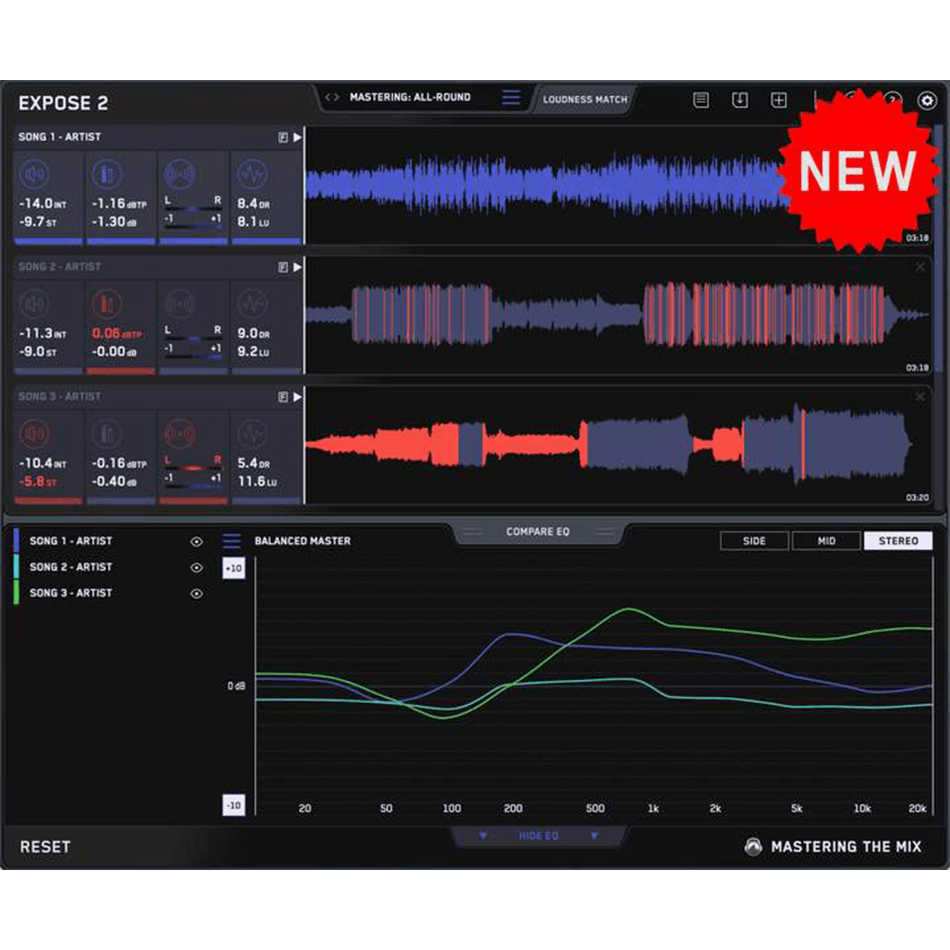
Mastering the Mix - Expose 2 - Main GUI
SAVE 50%
ENDS IN:

09

d

:

05

h

:

58

m

:

35

s

$40.00

$80.00

Save $40.00
★ Earn 89 Credits ($1.17 cashback)

0

SYSTEM & OS COMPATIBILITY
OS Support
macOS Windows
Plugin Formats ✓ VST3 • AU • AAX
Delivery Method ⚡ Manufacturer Serial
🎁 Free Bonus Gift with £15+ orders: choose from Aura, Blox Reverb, DP-06+, Things: Flip EQ at checkout.

Available in

✓ Instant Digital Delivery
✓ Official Partner License
✓ Safe & Secure Checkout
✓ Dedicated Customer Support
Guaranteed Safe & Secure Checkout
Visa Mastercard American Express Apple Pay Google Pay Klarna
IN-DEPTH LOOK

Product Overview

Expose is an audio quality control application that helps you identify and resolve issues with your music.

So many tracks get distributed with technical errors such as a poor EQ balance, clipping, over-compression, phase issues, and more.

With EXPOSE, you can deliver the best listening experience and release your music with confidence.

CAPABILITIES & CONTENT

Key Features

  • NEW Compare EQ shows how your average tonal balance compares to your imported reference track. Or you can select a genre-specific preset, all of which were created using sonic profiles from commercially successful tracks. This will allow you to check that your music aligns with your sonic goals and isn’t too muddy, dull, thin, or harsh before releasing.
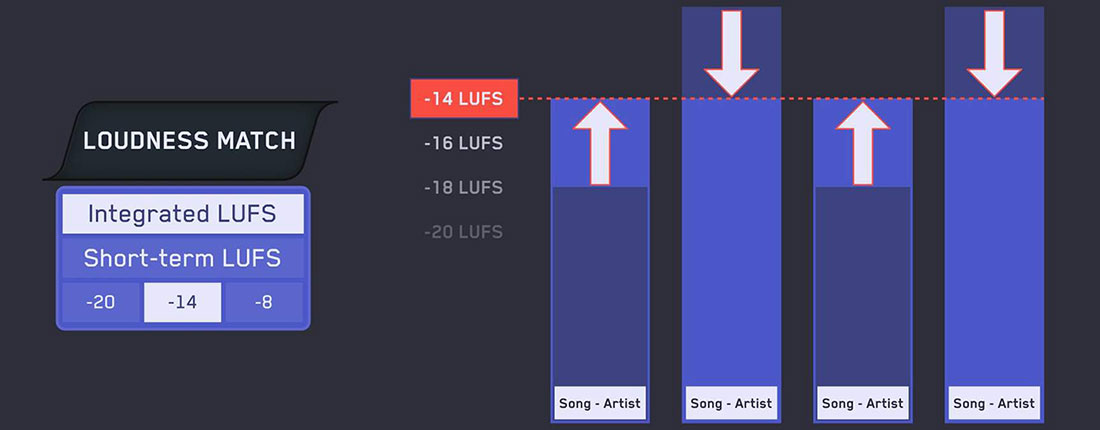
  • NEW Loudness Match normalizes the playback of all tracks in EXPOSE using a LUFS algorithm. The human ear perceives louder music to have a fuller bass and more clarity in the high frequencies. Loudness matching removes this bias and enables you to make more informed decisions for your music.
  • NEW Analysis Feedback gives you specific guidance on how to adjust your audio to get the sound you’re looking for. This helps you hit your technical goals, whether you’re aiming for a super-loud club master, or trying to optimize your music to sound great on streaming sites. (27 presets, and 5 user preset slots)
  • NEW User Interface with user experience and workflow improvements.
  • Get the technical details of your track in seconds. (LUFS Integrated, Short-term, decibels true-peak, left-right heat map, phase heat map, dynamic range, loudness range)
  • When issues are detected the readouts and waveform are highlighted to show you exactly where the issue is.
  • Measurements Include:

• Integrated LUFS.
• Short Term LUFS.
• Decibels True Peak (16X Oversampling).
• Sample Peak.
• Left / Right heat map.
• Correlation heat map.
• Short Term Dynamic Range.
• Loudness Range.


HOW TO USE EXPOSE IN 6 SIMPLE STEPS


1. Load A Track

Open the application and drag your audio onto the dashboard.

Drop your audio into EXPOSE


2. Select A Preset

Select where your audio will be heard at the top, such as Spotify, Youtube, CD etc. Then select your tonal balance profile by loading a reference track or choosing from the presets.

Select a preset in EXPOSE


3. Readings

The four sections give you detailed information about the loudness, peaks, stereo/phase information, and dynamic range of your audio. You can create a loop to see the readings of specific sections of your song.

View the technical details of your audio


4. Identify Issues

If EXPOSE detects that issues would arise, the section icon will turn red. Click on the section icon to isolate the issues on the waveform to see the exact location of the issues. The analysis feedback will give you specific guidance to help you hit your technical goals, whether you’re aiming for a super-loud master, or trying to optimize your music to sound great on streaming sites. 

Identify issues in your song before it's released


5. Check Your Tonal Balance

Compare EQ shows how your average tonal balance compares to your imported reference track. Or you can select a genre-specific preset, all of which were created using sonic profiles from commercially successful tracks. Anything within ±3dB represents a very similar tonal balance. Anything greater than ±6dB would represent a considerable difference in tonal balance and you may wish to make adjustments. 
Check Your Tonal Balance


6. Loudness Match and Playback

You can click the play icon or hit the spacebar to preview the audio. Click Loudness Match to normalize all audio to the same perceived volume for unbiased comparison.

Loudness_match_1728x3

SMART CO-PURCHASE UPSELL

Frequently Bought Together

Expose 2
Expose 2
$40.00 $80.00
Levels
Levels
$40.00 $80.00
Total for Both: $80.00
Expose 2 $40.00 $80.00

Discover More

View All Events

BROWSE ALL

Happening Now

View Black Friday 2026

SHOP LIVE EVENT
Your Playlist CLEAR
Your playlist is currently empty. Visit a product page and add some tracks to your playlist
Audio Player
0:00
0:00