Sign in to Loot Audio
Access your downloads, purchases and more
Access your downloads, purchases and more

Pulse is a revolutionary new downloader offering blazing fast speeds and powerful control over your libraries. Loot Audio uses Pulse to power some of our downloads and to make managing your libraries more efficient for you.
After your purchase we will send you a unique code (you will also find the code in your account). Use the code with Pulse to power your download and installation. More information about Pulse can be found here.
Included In:
What are Credits?
You earn Credits every time you purchase a product from Loot Audio. 3% of your order is added to your account in the form of Credits.
Use Credits for money off future orders or convert them to Sample Credits to download samples from the Sounds section of the site.
Nail your low-end in seconds
$80.00
Earn 177
Available in







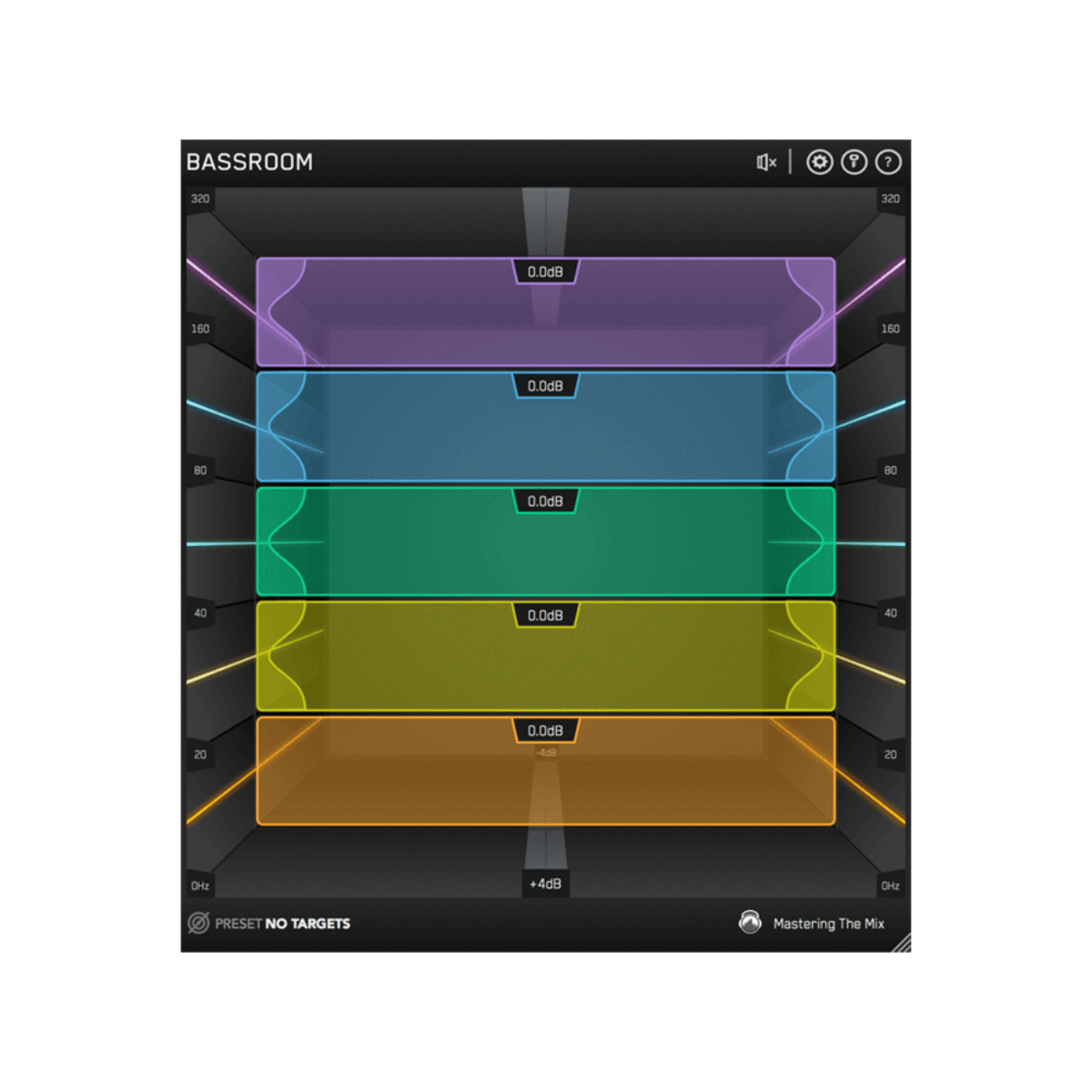
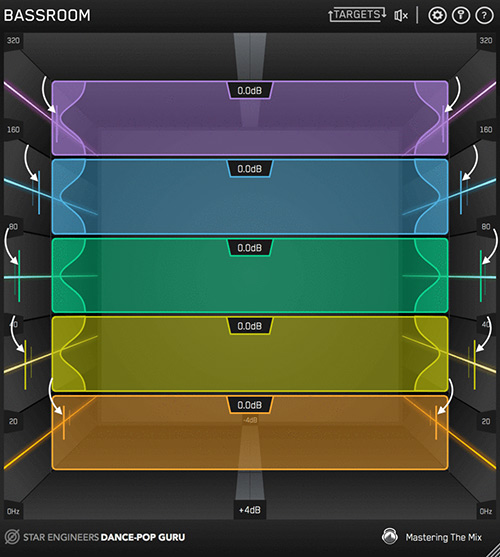
The targets on the walls of BASSROOM suggest the genre-specific EQ adjustments a great audio engineer in a world-class studio would make.
We analysed the best mixes in various genres to give you EQ target presets you can trust.
This isn’t simple ‘slowed-down’ frequency matching. The targets are a result of a complex algorithm that accurately identifies how the human ear perceives low-frequencies relative to the balance of the whole mix. BASSROOM analyses your mix and displays a target in each frequency band to help you make informed mixing decisions sonically relevant to your audio.
Matching the bands to target suggestions results in a clear and defined low-end that’s well balanced in the context of the whole mix. Use the targets to get a great starting point, then adjust by ear to tweak your low-end to perfection.
Download the 15 day Demo version and try today. Click the Demo Icon near the top of this page.
Purchase to receive your unlock code.
Master Channel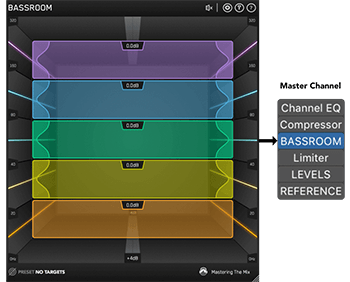
BASSROOM uses complex algorithms that accurately identifies how the human ear perceives low-frequencies relative to the balance of the whole mix. For that reason it should be loaded on your master channel so it can analyse and be applied to your whole mix.
Choose A Preset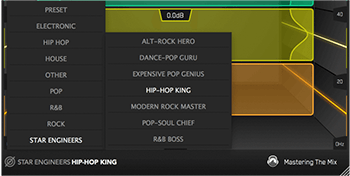
To get the most value from BASSROOM, start by selecting a preset that best suits the material you’re working on.
Create A Target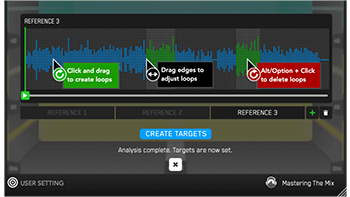
Alternatively, you can create your own target values by clicking the target icon in the bottom left corner and importing reference tracks. If you’re creating targets, we recommend clicking and dragging on the waveform to select the drop or chorus for the analysis, as this is usually the material with the best representation of the bass in the track. BASSROOM will create targets based on all the tracks loaded into the analysis window.
Shape your low-end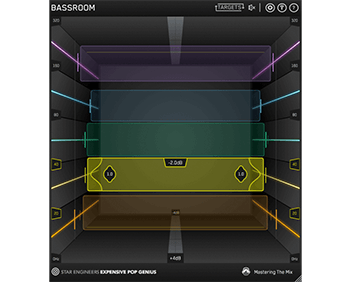
Now monitor a bass heavy section of your production (i.e. the drop or chorus), and you’ll see the targets move to the suggested EQ positions based on the tonal balance of your mix compared to the tonal balance of your preset. Use the targets to get a great starting point, then adjust by ear to tweak your low-end to perfection. The algorithm accounts for differences in loudness, so the targets will be accurate and relevant whether you’re mixing or mastering.
Level Match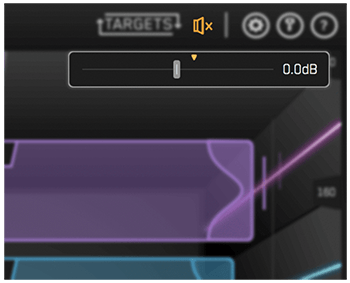
The EQ adjustments may have changed the overall gain of your audio. If the gain has changed by more than 2dB the speaker icon will turn orange. Hover your mouse over the bypass icon to open the output gain and level match pointer. Match the gain slider to the level match pointer to match the perceived loudness of your audio before it passed through BASSROOM.
Hear The Difference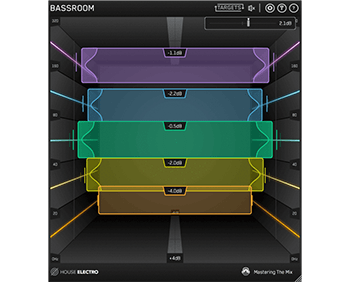
Not only will your low-end fall into place, but the level matching will give you a well balanced sound across the whole frequency spectrum. Toggle bypass on and off to hear the difference.
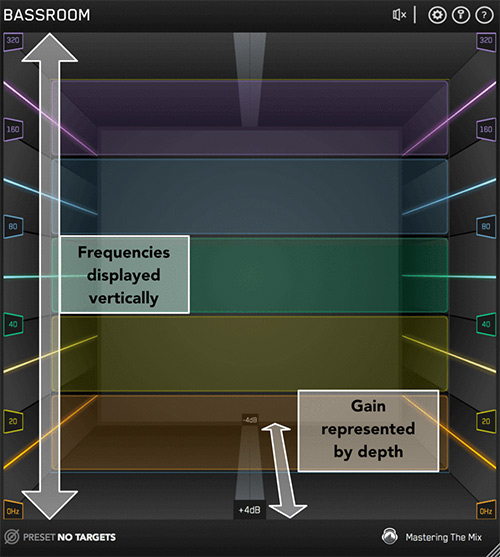
Ordinary EQs use a horizontal representation of frequencies and vertical representation of gain. BASSROOM takes a unique approach and focuses more on how we experience audio in the real world. Louder sounds feel closer while quieter sounds feel further away and lower frequencies are associated with a ‘foundation’ whilst higher frequencies are perceived as ‘air.
To reflect this, in BASSROOM frequencies are displayed vertically, and gain is represented by depth in the room.
When a band is on the central 0dB line in the middle of the room, there is no gain adjustment. Push frequency bands back in the room to decrease gain, and bring them forward to increase gain.
The unique and intuitive UI helps you visualise how you’re adjusting the low-end of your song. This gives you a more immersive mixing experience, helping you connect more with your music.
Available in VST, VST3, Audio Units and AAX formats (64-bit and 32-bit).
MAC OSX Requirements
OS X 10.8 or higher. 32-bit or 64-bit AU, VST 2/3 or AAX host.
WINDOWS Requirements
Windows 7, 8 or 10. 32-bit or 64-bit VST 2/3 or AAX host.
BASSROOM gives you unparalleled EQ quality when working with low-frequencies on your master channel. Other EQs can introduce transient ringing and smearing or phase distortion that reduces the quality and clarity of your audio.
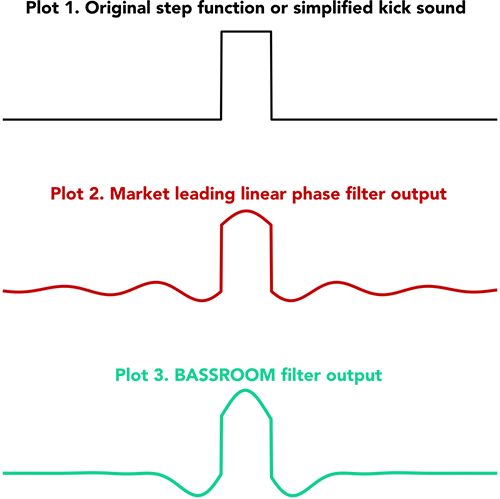
BASSROOM has specifically designed filters that have minimal phase distortion AND minimal transient distortion providing greater transparency than standard linear-phase filters at low-frequencies. This means that the low-end is not affected by unwanted phase changes that can alter the timbre of your audio or by transient distortion that means you lose the bite from kicks or bass-lines.
For example, the plots show the transient effects on a step function when applying a 6dB gain at 240Hz. Think of this as a simplified waveform of a kick drum. It's clear that the output of the filter in Plot 2 has an oscillation before and after the "hit". This is a "ringing" of the transient and can sound like a sucking effect. In Plot 3 BASSROOM’s EQ produces virtually no oscillation and so the transient is preserved.
With BASSROOM, you can transparently shape your low-end without compromising the clarity of your mix or master. This translates into retaining punch in the low-mids, and definition in the low-end compared to other EQs.