Sign in to Loot Audio
Access your downloads, purchases and more
Access your downloads, purchases and more

Pulse is a revolutionary new downloader offering blazing fast speeds and powerful control over your libraries. Loot Audio uses Pulse to power some of our downloads and to make managing your libraries more efficient for you.
After your purchase we will send you a unique code (you will also find the code in your account). Use the code with Pulse to power your download and installation. More information about Pulse can be found here.
What are Credits?
You earn Credits every time you purchase a product from Loot Audio. 3% of your order is added to your account in the form of Credits.
Use Credits for money off future orders or convert them to Sample Credits to download samples from the Sounds section of the site.
A Cutting-Edge Generative Music Assistant.


$73.14
$159.00
Earn 178







The Note Screen shows your generated melody in real-time, visually representing the rhythms and notes of each layer in different colors. This gives you a clear view of how each part fits within the composition. On the side, macro controls allow for high-level adjustments, making it easy to tweak your overall melody generation with precision.
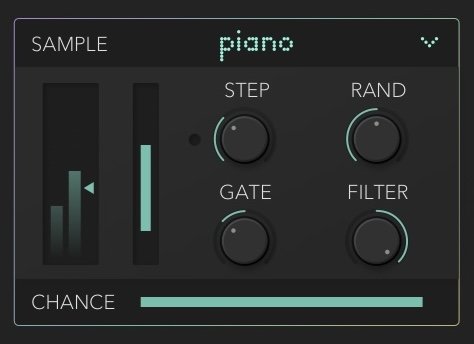
At the core of Motif 2's interface, the Layer Controls allow you to configure up to three layers of sound: bass, middle, and high.
Each layer in Motif 2 can be individually adjusted with parameters like sound selection, rhythmic control, note gating, filtering, velocity, volume, and creative randomization. The Chance parameter lets you control the probability of a note playing in real-time. The middle layer plays a key role, often shaping the other layers in certain composition modes.
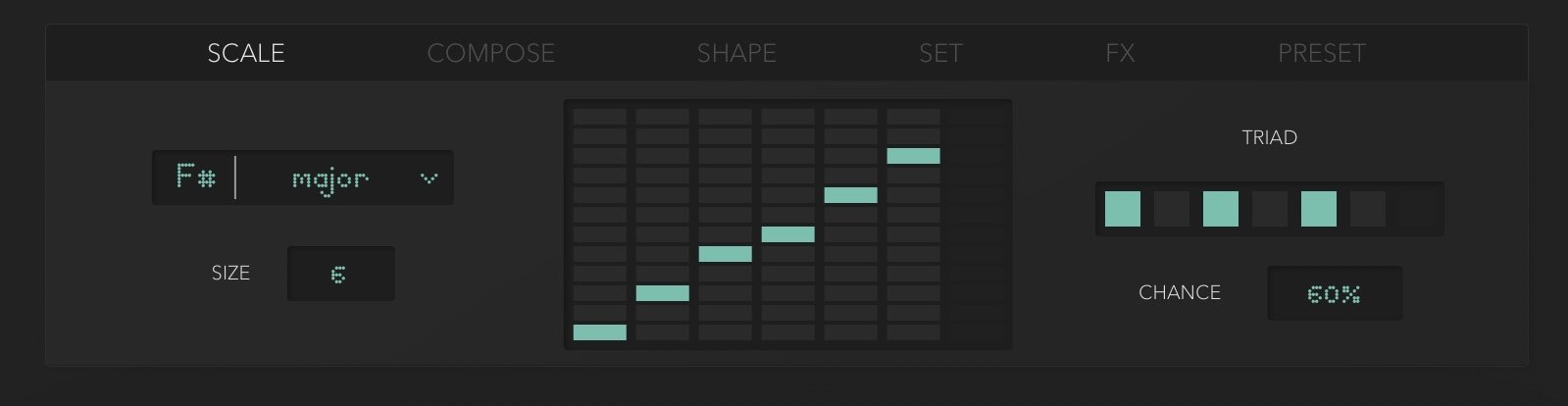
The new version of Motif 2 comes with a full blown scale panel. Now you can select your key/scale, customize your scale, edit all notes, select a unique base triad and adjust triad percentage. This percentage defines the probability of these notes to appear in generated musical ideas. New scale panel brings collects all scale related items into one place.
Motif comes with 4 different intelligent compose modes to trigger different melody/music generation processes.
Harmonic Mode will create a unique melody for the main layer and adjust other layers to the essential harmonies of the main layer, designed for creating more streamlined multi voice music.
Multi Mode creates unique melodies for each layer, great for complex sounding tunes.
Solo Mode lets only one layer play at a given time, just like a virtuoso.
Chord mode (New in Motif 2): Generates chords instead of single-note melodies, enriching the harmonic depth of your composition.
Duo Length Adjustment
Motif is highly flexible with lengths and offers two different length numbers; you can adjust a loop length and a total length for each progression slot. You can select shorter loops to create more dancey melodies or longer lengths for more cinematic/performative melodies (up to 16 measures).
Progression Presets & Lengths
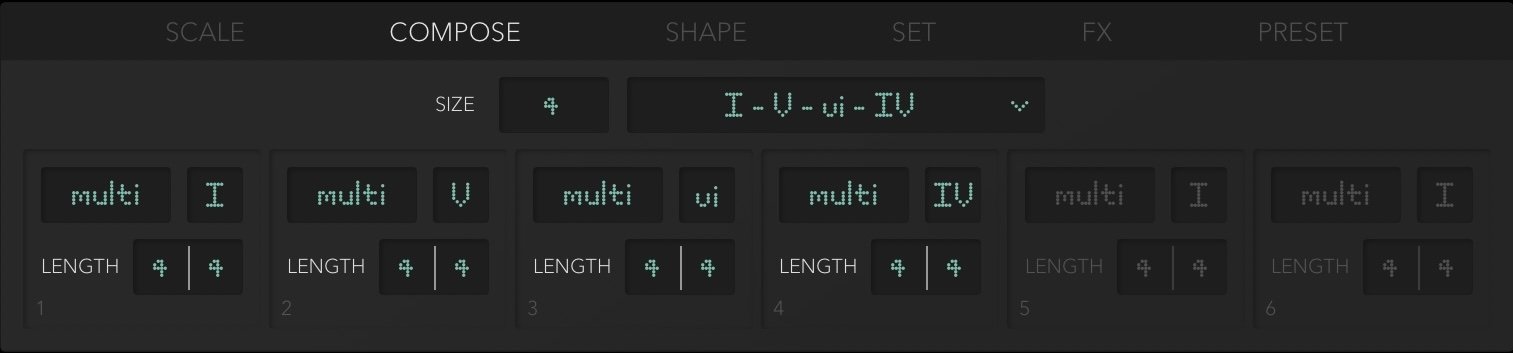
In the Compose Panel, the Progression Library features 30 carefully crafted chord progressions, covering both popular and unique options to jumpstart your compositions. You can easily load these progressions from the menu and adjust the progression size, scaling up to 6 steps for further customization.
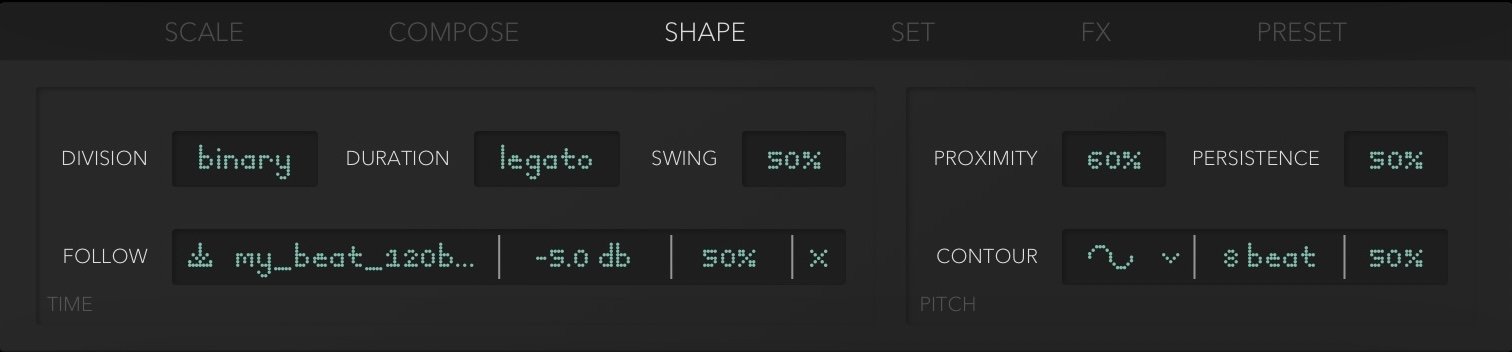
The Shape Panel is one of the most exciting new features in Motif 2, offering two groundbreaking tools for shaping melodies:
Beat Follow feature allows you to import a loop, and Motif 2 will adapt the rhythm of your melody to match the loop’s pattern. You can control the threshold and percentage to fine-tune how closely the generated rhythm follows your loop. Beat Follow gives you full control over the rhythmic feel.
Geometric Shapes aligns your melody’s note placements with geometric shapes, creating structured and repeatable contours within your melody. You can select from a variety of shapes (e.g., curves, peaks, waves) and adjust the percentage to decide how much influence the shape has on the melody.
In addition to these tools, Persistence defines how much each progression slot differs from the last, Proximity controls the closeness of consecutive notes in pitch, and Swing adds rhythmic variation with a percentage-based swing adjustment.
Generative Presets Panel & Undo
The Preset Panel in Motif 2 offers factory presets designed to trigger unique generative behaviors by altering the core algorithm, resulting in distinct melodic outcomes. Each preset has been carefully designed to showcase different aspects of Motif 2's generative capabilities. In addition, you can manage presets with standard options to Load, Save, and Save As, and categorize them as Factory or User presets.
Drag to Midi & Undo.
Empower your own sounds with Motif, just drag and drop the current idea to your DAW. Anywhere from the note screen that display the notes, click, drag and drop. You can drag multi midi as separate files by cmd-click (macOS) / ctrl-click (Win) while dragging. Since version 1.5, Motif plays third party midi files & sends midi signal.
The Undo Function allows you to revert changes easily using Cmd + Z (Mac) or Ctrl + Z (Windows), providing flexibility throughout the creative process.
Play Switch & Instant Regen.
Motif will play in sync with your DAW, locked to project bpm as default. Just play your DAW and you will see the engine start playing and going through the melodic progression. When you turn the play switch off, the engine only play midi files. We added a instant regenerate button next to play switches, to generate an idea instantly.
Smart randomise, create new ideas and versions in real-time, as it flows.
All layer generators are powered with cascade probability algorithms where you can adjust how frequently each layer “should” play. New version brings smart randomisation with knob control to create countless varieties of the root melody. With smart randomisation, all results are more musical and natural. You can even riff with Motif 2 for hours now utilising real time-randomisation and new shape tools.