🚨 Free product included with qualifying orders πŸš¨β˜…πŸš¨ Free product included with qualifying orders πŸš¨β˜…πŸš¨ Free product included with qualifying orders πŸš¨β˜…πŸš¨ Free product included with qualifying orders πŸš¨β˜…πŸš¨ Free product included with qualifying orders πŸš¨β˜…πŸš¨ Free product included with qualifying orders πŸš¨β˜…πŸš¨ Free product included with qualifying orders πŸš¨β˜…πŸš¨ Free product included with qualifying orders πŸš¨β˜…πŸš¨ Free product included with qualifying orders πŸš¨β˜…πŸš¨ Free product included with qualifying orders πŸš¨β˜…
Theme

Forthcoming Events

No forthcoming events scheduled.


Expired Events

Summer Sale Ended: 14 Jul 2026
May 2026 Deals Ended: 31 May 2026

Live Event

Active

Heatwave Sale 2026

Feel The Heat! From industry-leading plugins and Kontakt instruments to essential sample packs and cinematic sound design libraries.

Ends In
17d 20h 05m 16s
VIEW ALL DEALS

0

0

Change country:

We use cookies

We and selected 3rd parties use cookies or similar technologies as specified in our Cookie Policy

You can consent to the use of such technologies by using the "Accept" button

Manage cookies

Essential
Essential cookies required for business process and to make the website usable by enabling basic functions. (always active)
Marketing
Marketing cookies are used to serve personalised ads and analyse performance.

Plugin

Plugin Effects

W.A. Production

SphereComp

A Dual Mode Compressor Plugin

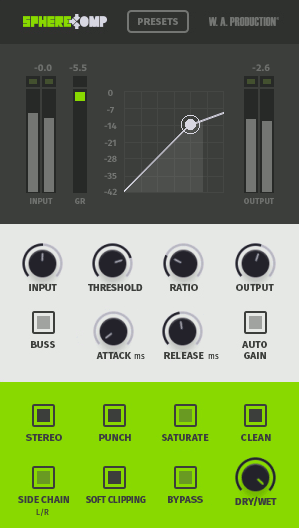
W.A. Production - SphereComp Plugins & FX Software GUI Artwork
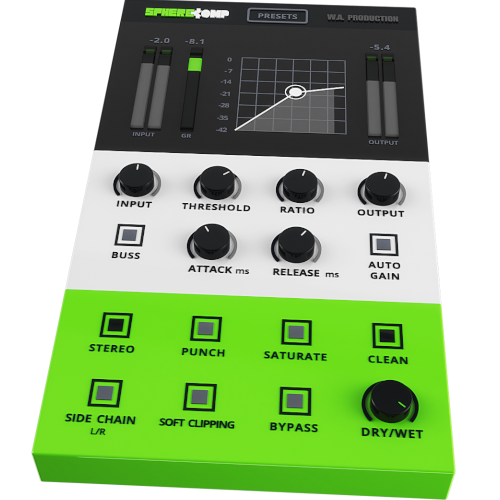
W.A. Production - SphereComp Screenshot 2

$59.00

Earn 159

Digital Download

0

Instant Access Direct download
100% Genuine Official license
Flexible Payments PayPal, Card or Wallet
Support Here to help
Guaranteed Safe & Secure Checkout
Visa Mastercard American Express Apple Pay Google Pay Klarna

Product Overview

W. A. Production has created the perfect way to approach and achieve proper compression. All producers know compression can either be an award-winning tool if used properly, or it can totally destroy your mix. Audio students are introduced to compression and most are left confused or scared to death of it. SphereComp is capable of catering to the seasoned pro and the beginner.

To get the same results you get with SphereComp you would have to spend thousands of dollars in high end rack gear, invest time getting acquainted, making adjustments over and over until you get the result you want. Not to mention installation and routing your patch bay. Breathe a sigh of relief. Don't dread compression. Embrace it.

WHAT IS DUAL-MODE?

W.A. Production - SphereComp - WHAT IS DUAL-MODE?

Dual mode allows YOU to switch from peak compression (regular mode) to RMS compression (buss mode).

If you route your drum tracks (or any other group of tracks) into a group track, you are able to compress this group as a whole. Tying or “gluing” the individual elements to perform as one. The Buss mode is designed especially for that, It reacts to the RMS (root mean square) or the average of the signal, creating a smooth and musical compression. Regular mode reacts to the peaks of the signal, with it, you are able to dynamically shape the individual tracks. Keep in mind that some individual tracks will benefit much more from RMS compression and some groups or mixes will benefit more from peak compression, so experiment and see what works best for your track.

FEATURES

  • Input – Control the input gain by +/- 15dB.
  • Threshold – Threshold (dB), when the signal level exceeds the threshold the compressor goes into action.
  • Ratio – (ratio/1) As an example, a 3:1 ratio means that for every 3dB the input signal exceeds the threshold, only 1dB will be allowed to pass by the compressor.
  • Output – Control the output gain by +/- 15dB.
  • Stereo – Switch between stereo and mono modes.
  • Punch – Parallel processing to add punch to the signal before the compression stage.
  • Saturate – Add tube style saturation to the compressed signal.
  • Clean – Make the compressor sound as clean as possible. If Punch or Saturate are on, it will reduce their effect giving you different timbre options.
  • Side Chain – Signal from the right channel input goes to the detector and the signal from the left channel input goes to the compressor.
  • Soft Clipping – Use to round the signal when it approaches 0.0dB and ensures it does not exceed it.
  • Bypass – Allows you to engage and disengage the compressor.
  • Dry/Wet – Mixes between the processed signal and the input signal creating a parallel compression effect, which leaves the peaks untouched while boosting the lower part of the signal.
  • Presets - To help you out there are also 45 presets that focus on individual instruments and drum sounds as well as groups, mix buss and mastering presets.

This is yet another way W.A. Production has made it easy for you to learn as you go. See what the pro's do and make your own modifications. And as if that wasn't enough to get you excited and ready to master compression, you will find pro tips and tricks inside the manual. That's right, we weren't going to just leave ya hanging to figure it out for yourself. There is a manual to assist you with getting started and getting the most out of Sphere Comp.

Additional Information

Windows 8 and later (64bit)
MacOS 10.15 and later
AAX - ProTools 11 or higher

Categories:

Compressor

Formats:

Plugin

Tags:

Effects

Changelog

V1.5.0

26/09/22

Updated June 11th 2020:

  • Protection scheme included / License key request
  • Saturation algorithm updated
  • Enhanced colors
  • Improved performance
  • Improved stability
  • Improved memory management
  • Bug fixes
  • Only 64 bit support Mac & PC

Discover More

View All Events

BROWSE ALL

Happening Now

View Heatwave Sale 2026

SHOP LIVE EVENT
Your Playlist CLEAR
Your playlist is currently empty. Visit a product page and add some tracks to your playlist
Audio Player

0:00
0:00