🚨 Free product included with qualifying orders πŸš¨β˜…πŸš¨ Free product included with qualifying orders πŸš¨β˜…πŸš¨ Free product included with qualifying orders πŸš¨β˜…πŸš¨ Free product included with qualifying orders πŸš¨β˜…πŸš¨ Free product included with qualifying orders πŸš¨β˜…πŸš¨ Free product included with qualifying orders πŸš¨β˜…πŸš¨ Free product included with qualifying orders πŸš¨β˜…πŸš¨ Free product included with qualifying orders πŸš¨β˜…πŸš¨ Free product included with qualifying orders πŸš¨β˜…πŸš¨ Free product included with qualifying orders πŸš¨β˜…
Theme

Forthcoming Events

No forthcoming events scheduled.


Expired Events

Summer Sale Ended: 14 Jul 2026
May 2026 Deals Ended: 31 May 2026

Live Event

Active

Heatwave Sale 2026

Feel The Heat! From industry-leading plugins and Kontakt instruments to essential sample packs and cinematic sound design libraries.

Ends In
17d 21h 25m 19s
VIEW ALL DEALS

0

0

Change country:

We use cookies

We and selected 3rd parties use cookies or similar technologies as specified in our Cookie Policy

You can consent to the use of such technologies by using the "Accept" button

Manage cookies

Essential
Essential cookies required for business process and to make the website usable by enabling basic functions. (always active)
Marketing
Marketing cookies are used to serve personalised ads and analyse performance.

Kontakt 7

Custom Libraries

Osterhouse Sounds

Sea Sampler

Drop samples into the sea, then unleash flocks of fish with your keyboard to play them.

Osterhouse Sounds - Sea Sampler Kontakt Instruments Software GUI Artwork

$30.00

Earn 78

Digital Download

0

Note: This product is compatible with Kontakt Player

4.0
Instant Access Direct download
100% Genuine Official license
Flexible Payments PayPal, Card or Wallet
Support Here to help
Guaranteed Safe & Secure Checkout
Visa Mastercard American Express Apple Pay Google Pay Klarna

Product Overview

Sea Sampler is a super unique and creative tool for generating chaotic textures.

Drop samples into the sea, then unleash flocks of fish with your keyboard to play them.

Features

  • Drop in your Samples - The Sea Sampler will analyze and automap them, creating an Object
  • Manipulate Objects - drag in their center to move them, or drag on edges to resize. You can also remove them by making them very small
  • Spawn Fish - Each pitch you play spawns a different color fish. The fish's starting speed depends on how hard you play. When fish collide with objects, the object's sample gets triggered, whatever pitch the fish is. The faster the fish, the louder it will be.
  • Emitter - This is where fish spawn from. When you drag it around, it will attract the fish. The faster it is moved, the more the fish will be attracted. Note that if you turn down Visual Range, the fish further away won’t be able to see the emitter.
  • Pedal - Hold down the Pedal to keep fish alive even after you have let go of the key
  • Pitchwheel - Speed up or slow down the boid simulation’s framerate using the Pitchwheel
  • Max Fish Control - This controls how many fish there can be at once. Once the limit is reached, the oldest fish are replaced by the new ones
  • Modwheel - The higher you put the Modwheel, the more often fish will emit
  • Expression (CC 11) - Move Expression to twirl the emitter in a circle
  • Change the sound of objects by changing their pitch, filtering them, sending them to different reverbs, or enveloping them.

What's Included?

  • Start out with 30 nki presets
  • Presets include samples taken from other Osterhouse Sounds libraries, synthesized sounds, and recordings of household objects

THE FUN STUFF

Drop in your Samples

drop-samples

The Sea Sampler will analyze and automap them, creating an Object

Manipulate Objects

manipulate

Drag in the center to move them

Drag on edges to resize

Make them very small to remove

Spawn Fish
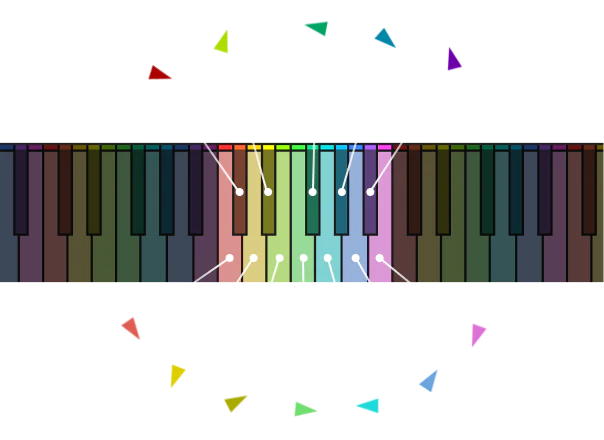
fish-keys

Each pitch you play spawns a different color fish. The fish's starting speed depends on how hard you play

When fish collide with objects, the object's sample gets triggered, whatever pitch the fish is

The faster the fish, the louder it will be

CONTROL THE FISH

Emitter

This is where fish spawn from. When you drag it around, it will attract the fish. The faster it is moved, the more the fish will be attracted. Note that if you turn down Visual Range, the fish further away won’t be able to see the emitter.

Max Fish

This controls how many fish there can be at once. Once the limit is reached, the oldest fish are replaced by the new ones.

Pedal

Hold down the Pedal to keep fish alive even after you have let go of the key

Modwheel

The higher you put the Modwheel, the more often fish will emit

Pitchwheel

Speed up or slow down the simulation’s framerate using the Pitchwheel

Expression (CC 11)

Move Expression to twirl the emitter in a circle

Control the Objects

Change the sound of objects by changing their pitch, filtering them, sending them to different reverbs, or enveloping them.

Reviews

4.0/5.0

(Average of 2 reviews)

Sort By:

Array

Additional Information

  • Mac Requirements: Intel Macs (i5 or higher): macOS 10.15, 11 or 12 (latest update).
  • Apple Silicon Macs (via Rosetta 2 & natively on ARM in Standalone or in hosts that support it): macOS 11 or 12 (latest update).
  • Windows Requirements: 10 or 11
  • Kontakt Player Version 7.3 or above (Will also work in Full Kontakt Version 7.3 or above)
  • Presets include samples taken from other Osterhouse Sounds libraries, synthesized sounds, and recordings of household objects. These samples are available as WAV files

Categories:

Experiments Sound Design

Formats:

Kontakt

Genres:

All Genres Ambient

Tags:

Experimental

Discover More

View All Events

BROWSE ALL

Happening Now

View Heatwave Sale 2026

SHOP LIVE EVENT
Your Playlist CLEAR
Your playlist is currently empty. Visit a product page and add some tracks to your playlist
Audio Player

0:00
0:00