🚨 Free product included with qualifying orders 🚨🚨 Free product included with qualifying orders 🚨🚨 Free product included with qualifying orders 🚨🚨 Free product included with qualifying orders 🚨🚨 Free product included with qualifying orders 🚨🚨 Free product included with qualifying orders 🚨🚨 Free product included with qualifying orders 🚨🚨 Free product included with qualifying orders 🚨🚨 Free product included with qualifying orders 🚨🚨 Free product included with qualifying orders 🚨
Change country:
WISHLIST ABOUT BLOG SUPPORT CREDITS SAMPLE CREDITS CONTACT

Forthcoming Events

No forthcoming events scheduled.


Expired Events

Summer Sale Ended: 14 Jul 2026
May 2026 Deals Ended: 31 May 2026

Live Event

Active

Heatwave Sale 2026

Feel The Heat! From industry-leading plugins and Kontakt instruments to essential sample packs and cinematic sound design libraries.

Ends In
36d 02h 16m 49s
VIEW ALL DEALS

0

0

Change country:

We use cookies

We and selected 3rd parties use cookies or similar technologies as specified in our Cookie Policy

You can consent to the use of such technologies by using the "Accept" button

Manage cookies

Essential
Essential cookies required for business process and to make the website usable by enabling basic functions. (always active)
Marketing
Marketing cookies are used to serve personalised ads and analyse performance.

Plugin

Plugin Instruments

Bleass

BLEASS Arpeggiator

$39.00

Earn 105

BLEASS Arpeggiator
BLEASS Arpeggiator
BLEASS Arpeggiator
BLEASS Arpeggiator
BLEASS Arpeggiator
BLEASS Arpeggiator

Hands-On Creative Arpeggiation

0

Plugin

Plugin Instruments

Bleass

BLEASS Arpeggiator

$39.00

Earn 105

Hands-On Creative Arpeggiation

0

BLEASS Arpeggiator redefines classic arpeggiation with a modern, powerful approach, built in collaboration with renowned French producer Canblaster. Moving beyond the traditional up-and-down patterns, it offers polyrhythms, polyphony, and a variety of arpeggio patterns. With a user-friendly, hands-on interface, BLEASS Arpeggiator makes live and studio creativity easy and intuitive. Real-time control is enhanced by XY pads, LFOs, and BLEASS' unique Motion Sequencer, allowing musicians to explore dynamic modulation with ease. Designed to work seamlessly with any synth or as a standalone MIDI generator, BLEASS Arpeggiator also features a built-in FM synth for punchy arpeggiated sounds. It’s available now on both desktop and iOS, bringing musicians a versatile, inspiring arpeggiator to elevate their sound.

Product Overview

BLEASS Arpeggiator redefines classic arpeggiation with a modern, powerful approach, built in collaboration with renowned French producer Canblaster. Moving beyond the traditional up-and-down patterns, it offers polyrhythms, polyphony, and a variety of arpeggio patterns.

With a user-friendly, hands-on interface, BLEASS Arpeggiator makes live and studio creativity easy and intuitive. Real-time control is enhanced by XY pads, LFOs, and BLEASS' unique Motion Sequencer, allowing musicians to explore dynamic modulation with ease.

Designed to work seamlessly with any synth or as a standalone MIDI generator, BLEASS Arpeggiator also features a built-in FM synth for punchy arpeggiated sounds. It’s available now on both desktop and iOS, bringing musicians a versatile, inspiring arpeggiator to elevate their sound.

Features

  • POLYRHYTHMIC AND POLYPHONIC ARPEGGIATION – Goes beyond traditional arpeggios with the ability to create complex rhythmic and multi-note patterns.
  • CUSTOMIZABLE ARPEGGIO PATTERNS – Offers a wide array of built-in patterns to inspire creativity, with options to configure and personalize.
  • INTUITIVE, HANDS-ON INTERFACE – User-friendly design that feels natural and is perfect for real-time adjustments.
  • INTERACTIVE XY PADS – Allows expressive modulation, especially enjoyable on touch devices like iPads.
  • ADVANCED LFOs – Two LFOs provide dynamic parameter modulation for evolving arpeggios.
  • MOTION SEQUENCER – Unique BLEASS feature that sequences modulation patterns for added depth.
  • BUILT-IN FM SYNTH – A simplified FM synthesizer provides punchy, bright sounds tailored for arpeggios.
  • FLEXIBLE MIDI OUTPUT – Can act as a MIDI generator for use with any external synth or instrument.
  • PERFORMANCE CONTROLS – Compatible with mod wheels, MIDI controllers, and real-time performance adjustments.
  • CROSS-PLATFORM AVAILABILITY – Fully functional on both desktop and iOS platforms.

ARPEGGIATOR TAB

The settings within the Arpeggiator Tab control the rhythmic and pitch patterns produced by BLEASS Arpeggiator.

RESET

The Reset section allows the Arpeggiator, LFOs and Motion Sequencer to be reset in response to the DAW’s beat or a specific incoming MIDI note.

Target: Choose the elements of BLEASS Arpeggiator that should be restarted when a reset event occurs.

Mode: Choose whether to trigger reset events based on the DAW’s beat or an incoming MIDI note.
– When in Beat mode, use the Rate dial to set how frequently a reset event will be generated.
– When in MIDI Note mode, use the Note selector to specify which incoming MIDI note will trigger a reset event.

TRIGGER

The Trigger section controls the basic rate at which BLEASS Arpeggiator steps through the pattern of notes it creates.

Mode: Determines the synchronisation source for the step rate…:

  • FREE uses an internal timer based on milliseconds
  • SYNC uses an internal timer based on DAW’s beat
  • BEAT synchronises steps with the host DAW’s beat and synchronises the arpeggiator pattern position to the host’s bar-and-beat position.
  • MIDI NOTE advances to the next step in response to an incoming MIDI note.

Rate: Determines the base rate at which steps are triggered.

  • In Free mode this is set in milliseconds.
  • In Sync and Beat modes this is set in note lengths (1/4 for a crotchet, 1/8 for a quaver, 1/16 for a semiquaver, etc.).
  • The setting has no effect when in MIDI Note trigger mode.

Multiplier: The value you set here is multiplied by the Rate setting to determine the actual rate at steps are triggered. A value greater than 1 will reduce the trigger rate; a value less than 1 will increase the trigger rate. This setting has no effect when in MIDI Note mode.

Groove: Constantly varies the trigger rate to create a classic swing feel. A setting of 50 results in no swing; a setting of 75 gives the maximum amount of swing. This setting has no effect when in MIDI Note trigger mode

Filter: Allows step triggers to be filtered based on their timing. This setting has no effect when in MIDI Note trigger mode.

  • ALL allows all step triggers to pass unaffected
  • NO TRIPLETS prevents any triplet-timed steps from passing
  • ONLY TRIPLETS allows only triplet-timed steps to pass

Note: Specify the incoming MIDI note that will cause BLEASS Arpeggiator to generate a step trigger. This setting only has an effect when in MIDI Note trigger mode.

PATTERN

Pattern Selector: Turn the dial to choose from 62 different rhythmic patterns, or set to the left-most OFF position if you do not want to apply a trigger pattern.

The chosen pattern is represented by the segmented readout at the centre of the dial. Each segment represents a step in the pattern, and each is highlighted in turn in response to step trigger events. If the currently active step is enabled, as indicated by a filled segment, a note will be generated when the step is triggered, otherwise no note will be played in response to a step trigger.

Next / Mute: These buttons determine what happens when the currently active step is disabled.
When Next is active, the note that is due to sound is held back until the next active step. This means you will not lose any notes from your arpeggio, but the timing of those notes will be affected.
When Mute is active, the next note due to sound is skipped altogether and the arpeggio’s note pattern advances to its next step. This results in a constantly varying pattern of notes being produced.

Offset: When you play notes into BLEASS Arpeggiator each of those notes is assigned a position in the sequence of notes that will be generated. Typically, the first step in a trigger pattern will generate the first note in the sequencer, the second step will trigger the second note, and so-on. The Offset dial changes this relationship, shifting the note sequence with respect to the trigger pattern.
For example, with an Offset value of 1 the note sequence will run one step ahead of the trigger pattern, whilst a value of -1 would cause the note sequence to run one step behind the trigger pattern.

Chance: Specifies the chance, as a percentage, that an active step trigger will actually result in a note being generated. This percentage chance applies no matter the position of the Pattern Selector or state of the Next / Mute buttons.

SEQUENCE

BLEASS Arpeggiator creates a sequence of notes based on the chord or notes you play into it. The settings in this section allow you to determine details of the generated sequence.

Play Mode: Turn the dial to choose from 20 base sequence patterns. Some are quite basic, others quite complex.

Offset: Shifts the start position of the base sequence. For example, a setting of 1 will cause the second note of the sequence to be considered the start position.

Step Jump: Sets the number of steps by which the sequence advances after a note has been triggered.

Octave Range: Sets the number of octaves over which the note sequence will be repeated. When set to “0”, only the held notes will be played. When set to “1”, notes that are one octave higher than the held notes are added to the arpeggio; higher settings add additional octaves.

Octave Offset: Applies a positive or negative octave shift to the note sequence.

Note Repeat: Repeats each note in the sequence a number of times before advancing to the next note.

Gate: Determines the length of the notes generated by BLEASS Arpeggiator, as a percentage of the current Trigger Rate setting.
When the Trigger Mode is set to MIDI Note, the Gate setting is ignored, and the generated note plays for as long as the step trigger note is held down.

Repeats: Specifies the number of times a note sequence will be repeated.

Reverse: When enabled, reverses the play direction of the note sequence. Use to create downward arpeggios.

Forward/Backward: When enabled, causes the play direction to alternate between forward and backward directions. Use to create up/down arpeggios.


POLYPHONY

Unlike classic arpeggiators that can only play one note at a time, BLEASS Arpeggiator can create multi-line and polyphonic arpeggios. The controls in this section let you set this up.

Chord: When enabled, step triggers cause all notes of the sequence to play simultaneously.

Bass: Adds an additional bass note to the sequence. The note is based on the lowest note in the sequence, pitched down by the number of octaves selected here.

Polyphony: Determines how many of the sequence’s notes will sound in response to each step trigger. This setting has no effect when Chord mode is enabled.

Note Lookup: Determines what happens when Polyphony is greater than 1 and the sequence position overshoots the number of notes within the sequence. This setting has no effect when Chord mode is enabled or when Polyphony is set to 1.
– NORMAL: The sequence position returns to the beginning plus any remaining overshoot.
– MIRRORED: The sequence position bounces back from the end position by the remaining overshoot amount.

Gap: Specifies the number of sequence steps separating notes when Polyphony is greater than 1. This setting has no effect when Chord mode is enabled or when Polyphony is set to 1.

Velocity Spread: Determines the note-on velocity separation between notes that sound simultaneously. This setting has no effect when Chord mode is enabled or when Polyphony is set to 1.

VELOCITY

The settings in this section control the note-on velocity of the notes being generated by BLEASS Arpeggiator.

Fixed: When enabled, defines a fixed velocity for all generated notes. When disabled, note velocity is derived from the velocities of the notes that are being held down.

Velocity: Determines the velocity value of generated notes when Fixed is enabled.

Randomness: Introduces a randomising element to the velocity of generated notes. Randomness is applied after any fixed velocity setting, and so still has an impact when Fixed is enabled.

LFO TAB

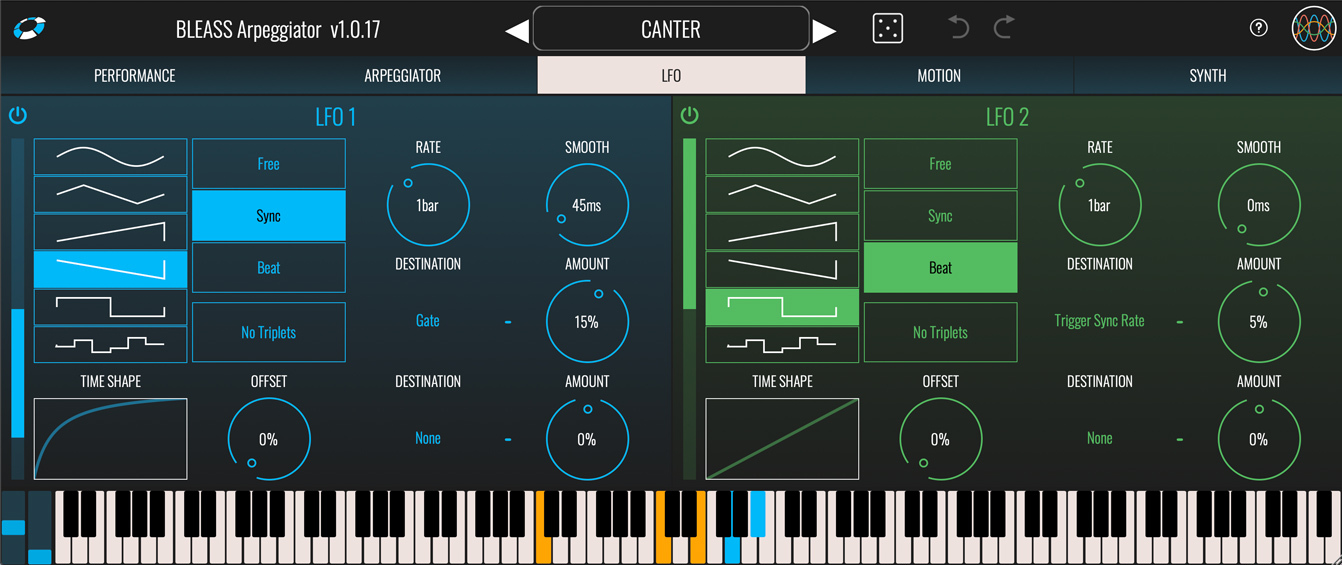
BLEASS Arpeggiator includes a pair of LFOs (Low Frequency Oscillators) that can be used to modulate the plugin’s parameters. This is a great way to create dynamic, evolving arpeggios.

LFO 1 / LFO 2

On/Off Button: Enables or disables the LFO.

Shape: Sets the shape of the LFO waveform. Choose from sine, triangle, sawtooth up, sawtooth down, square and sample-and-hold

Time Shape: The Time Shape graph alters the rate at which the LFO moves through its waveform cycle. When the graph shows a straight line no time shaping will be applied. Dragging the line introduces a curve that illustrates how the LFO’s timing will change through each cycle of the waveform. Double click the graph to reset the time shape. The results of the Time Shape are clearly visible in the LFO’s visualisation.

Sync Mode: Choose the LFO’s synchronisation mode.

  • FREE uses internal timing for the LFO.
  • SYNC synchronises the LFO to the host DAW’s tempo.
  • BEAT synchronises the LFO to the host DAW’s tempo and bar position.

No Triplets: When enabled, any triplet value selected for the LFO Rate (1/3, 1/6 etc.) will be ignored. Not available in FREE sync mode.

Offset: Offsets the start point of the LFO’s cycle, in effect shifting the LFO’s phase with respect to the DAW’s tempo or internal clock.

Rate: 
Sets the time taken for the LFO to complete one cycle of its waveform. The Rate is expressed as milliseconds and seconds when in FREE sync mode, otherwise it is expressed in terms of note length.

Smooth: The Smooth parameter imposes a maximum rate of change on the LFO’s output values. This means that, for example, when a saw tooth LFO wave reaches the end of a cycle the LFO value ramps down to the minimum rather than immediately dropping to the minimum, thereby smoothing-out the sudden value change. This can also have the effect of damping the magnitude of the LFO. The results of smoothing are clearly visible in the LFO’s visualisation.

Destination (x2): Specifies a target parameter that will be modulated by the LFO.

Amount (x2): Scales the strength of the LFO’s impact on the assigned destination parameter. Negative values will reverse the polarity of the modulation – in other words, when the LFO is rising the destination parameter’s value will be reduced.

MOTION TAB

BLEASS Arpeggiator’s built in Motion Sequencer allows patterns of values to be sequenced and then used to modulate up to two of the plugin’s parameters.

ENVELOPE FOLLOWER

On/Off Button: Enables or disables the sequencer.

Mode: Choose the Motion Sequencer’s synchronisation mode.

  • SYNC synchronises the Motion Sequencer to the host DAW’s tempo. The DAW does not need to be playing.
  • BEAT synchronises the Motion Sequencer to the host DAW’s tempo and bar position.
  • NOTE CHANGE synchronises the causes the Motion Sequencer to the host DAW’s tempo, and jumps to the next step in response to a note being played.

Resolution: Sets the length of each sequencer step with respect to the host DAW’s tempo.

Grid: When Snap ON is active, values you set in the Motion Sequencer will snap to the vertical grid. When Snap OFF is selected, any value can be set within the sequence.

Reset: Resets the sequencer’s steps to their default state

Sequencer Grid: Click on the sequencer grid to set a value for the corresponding sequencer step. You can also right-click on the grid to open a popup where you can type in a value for the step (1 = maximum; 0.5 = middle; 0 = minimum).

Step Shape Buttons: The buttons below each step control the step shape. Clicking the button will cycle through the available step shapes; alternatively, right clicking on a button opens a popup in which you can enter the number that corresponds with the desired step shape:

0 – STEP: Outputs a constant value for the duration of the step.
1 – RAMP: The step’s value will change from its initial value to its ending value over the duration of the step. The ending value is determined by the subsequent step.
2 – UP: The step’s value will change from an initial value that you set to the maximum value over the duration of the step.
3 – DOWN: The step’s value will change from the minimum value to an ending value that you set, over the duration of the step.
4 – SMOOTH RAMP: Similar to RAMP, but with smoothing of the value transitions between steps.

Length: Specifies the number of steps within the sequence.

Randomness: Introduces a random element to the value of the current step. The higher the Randomness setting, the larger the possible deviation from the step’s programmed value.

Destination (x2): Specifies a target parameter that will be modulated by the Motion Sequencer.

Amount (x2): Scales the strength of the Motion Sequencer’s impact on the corresponding destination parameter. Negative values will reverse the polarity of the modulation.

PERFORMANCE TAB

MOD. WHEEL

Receives the controller messages from your keyboard’s (or other performance device’s) modulation wheel. Responds to CC1.

Response Curve: The graph indicates the current incoming mod. wheel (MIDI CC 1) value. Dragging the graph’s line changes the way BLEASS Arpeggiator responds to the incoming value.

Destination: Assign up to two parameters that will be modulated by incoming mod. wheel messages.

Amount: Controls how strongly the destination parameter will be affected by the mod. wheel messages. Positive settings will cause the destination parameter to be increased in response to an increasing mod. wheel value; negative settings will cause the destination parameter to be decreased in response to an increasing mod. wheel value.

XY-1, XY-2

BLEASS Arpeggiator includes a pair of XY Controllers for creating exciting interconnected parameter modulations. The XY Controller panels generate two modulation values simultaneously – and X and a Y value. Drag the control point to vary these values.

Hold: When disabled, the XY control point will snap back to the XY Controller’s centre when released. When enabled, the XY control point will remain in its current position when released.

X Dest: Choose the parameter that will be modulated when the control point is moved in the X (horizontal) direction.

X Amount: Controls how strongly the destination parameter will be affected by changes to the X (horizontal) position of the control point. Positive settings will cause the destination parameter to be increased in response to an increasing X position; negative settings will cause the destination parameter to be decreased in response to an increasing X position.

Y Dest: Choose the parameter that will be modulated when the control point is moved in the Y (vertical) direction.

Y Amount: Controls how strongly the destination parameter will be affected by changes to the Y (vertical) position of the control point. Positive settings will cause the destination parameter to be increased in response to an increasing Y position; negative settings will cause the destination parameter to be decreased in response to an increasing Y position.

SYNTH TAB

BLEASS Arpeggiator features a built-in stripped-down FM synthesiser whose sound is a perfect match for many arpeggiated parts. You can use this on its own, use it to reinforce the sound of another synth, or disable it altogether.

The synth’s oscillator section generates a sine wave whose frequency can be modulated by the FM 1 and FM 2 oscillators. In the language of FM, the main oscillator can be thought of as the carrier, whilst FM 1 and FM 2 are modulators attached to that carrier.

Additional Information

MAC

  • OS X (macOS 10.9 and later (64-bit only) (including intel & silicon processors))
  • Memory: 8 GB
  • Disk: 1 GB
  • Plugins: VST-3, AU, AAX

WINDOWS

  • Windows (Windows 10 or higher)
  • Memory: 8 GB
  • Disk: 1 GB
  • Plugins: VST-3, AAX

Categories:

Synthesizers Midi, Chord and Scale Tools

Formats:

Plugin

Genres:

All Genres

Tags:

Arp Plugin synth

Discover More

View All Events

BROWSE ALL

Happening Now

View Heatwave Sale 2026

SHOP LIVE EVENT
Your Playlist CLEAR
Your playlist is currently empty. Visit a product page and add some tracks to your playlist
Audio Player

0:00
0:00