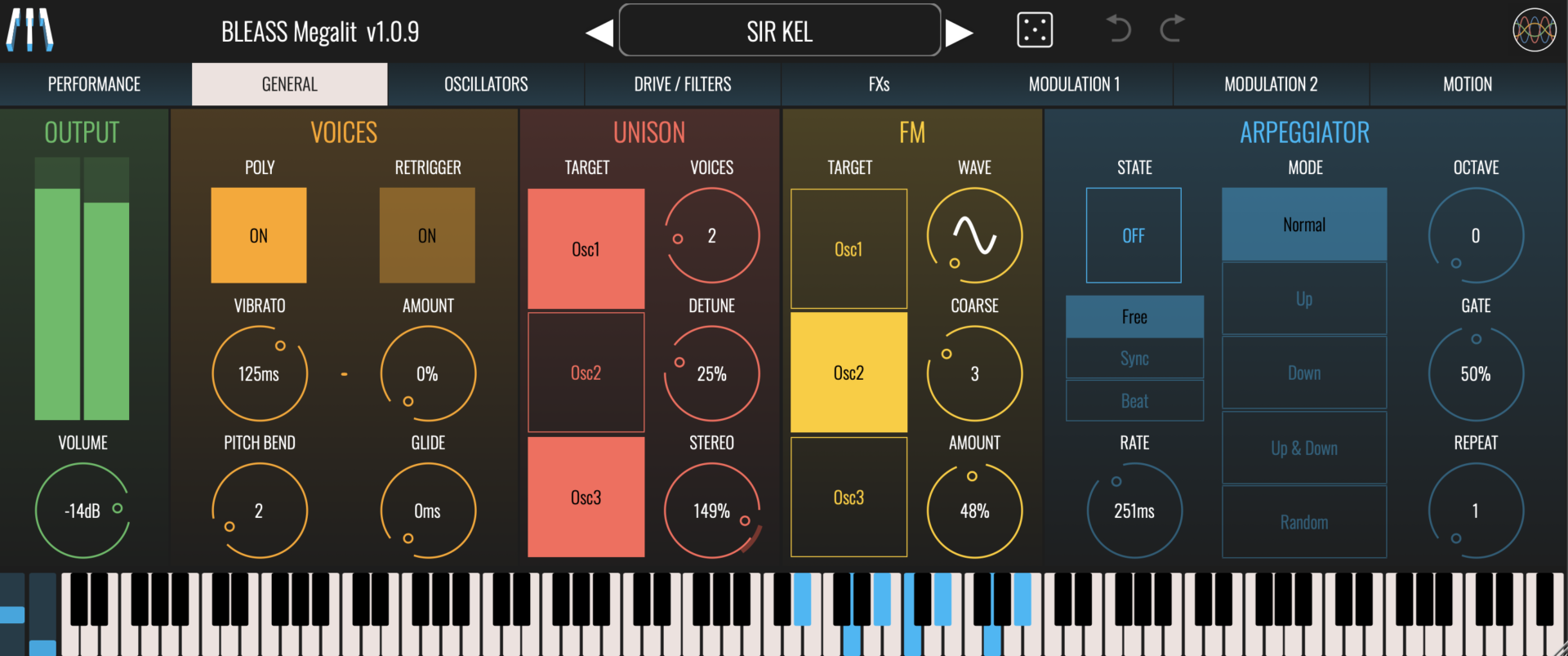







Set up the general parameters of the Synth such as Output, Polyphony, Glide, Unison…
OUTPUT
Meters: Indicates Megalit’s current output level
Volume: Controls Megalit’s master output level
VOICES
Poly: Enables or disables Megalit’s polyphonic mode.
Retrigger: Enables or disables the retriggering of ADSR envelopes when playing legato. Has no effect when Poly is enabled.
Vibrato: Sets the rate, in milliseconds, of global pitch vibrato
Amount: Sets the strength of global pitch vibrato. A setting of 100% means the pitch will oscillate between -1 semitone and +1 semitone.
Pitch Bend: Determines the maximum pitch bend range, in semitones.
Glide: Sets the time taken for the synth’s pitch to ramp from the previously-played note to the currently-played note.
UNISON
Megalit includes a Unison effect that creates up to seven duplicates of an oscillator’s voice. This can create a thicker, fuller sound.
Target: Enables or disables the Unison effect for each oscillator.
Voices: Sets the number of voice duplicates to create, up to a maximum of 7.
Detune: Sets the amount of detuning to apply to the unison voices. The detuning is spread amongst the voices, with a setting of 100% meaning that the most-detuned voice(s) will be 1 semitone above and/or below the played note.
Stereo: Sets the amount of stereo spread to apply to the unison voices.
FM
Megalit’s FM feature provides a dedicated oscillator that can be used to rapidly modulate the pitch of the main oscillators. These pitch modulations give rise to harmonics within the main oscillator’s output that can radically change the timbre and character of the sound.
Target: Determines the oscillators that will be modulated by the FM oscillator.
Wave: Sets the waveform of the FM oscillator. Different waveforms create different patterns of harmonics within the targeted oscillators.
Coarse: The frequency of the FM oscillator is always related to the note being played. The Coarse value acts as a multiplier that is applied to the frequency of the played note.
For example, a middle A note has a frequency of 440Hz. If you play this note with the FM Coarse value set to “1”, the FM oscillator’s frequency will also be 440Hz. If you then increase the Coarse value to “2”, the FM oscillator’s frequency will be 880Hz. A setting of “0.5” will create an FM frequency of 220Hz. And so-on.
Amount: Determines the amplitude of the FM oscillator signal. Higher values lead to a greater impact on the targeted oscillators.
ARPEGGIATOR
State: Enables or disables the arpeggiator
Mode: Sets the sync mode of the arpeggiator.
FREE uses an internal timer that is set within the instrument.
SYNC synchronises the arpeggiator to the host DAW’s beat.
BEAT synchronises the arpeggiator to the host DAWs beat and synchronises the arpeggiator’s pattern position to the host’s bar-and-beat position.
Rate: Sets the speed of the arpeggiator. The value you enter represents the time between each note that the arpeggiator produces.
In FREE mode, the rate is set in milliseconds
In SYNC and BEAT modes, the rate is set as a note length.
Mode: Determines the pattern of notes that the arpeggiator will produce.
NORMAL: Notes are played in the order in which they were triggered.
UP: Notes are played in pitch order, from lowest to highest.
DOWN: Notes are played in pitch order, from highest to lowest.
UP/DOWN: Notes are played in pitch order from lowest to highest, and then back to lowest.
RANDOM: Notes are played in a random order
Octave: Sets the number of additional octaves that the arpeggiator should cover. When set to “0”, only the triggered notes will be played. When set to “1”, notes that are one octave higher than the triggered notes are added to the arpeggio; higher settings add additional octaves.
Gate: Sets the length of the arpeggiator’s notes, as a proportion of the Rate setting.
Repeat: Sets the number of times each note is repeated before the arpeggiator moves on to the next note.