Sign in to Loot Audio
Access your downloads, purchases and more
Access your downloads, purchases and more

Pulse is a revolutionary new downloader offering blazing fast speeds and powerful control over your libraries. Loot Audio uses Pulse to power some of our downloads and to make managing your libraries more efficient for you.
After your purchase we will send you a unique code (you will also find the code in your account). Use the code with Pulse to power your download and installation. More information about Pulse can be found here.
Included In:
What are Credits?
You earn Credits every time you purchase a product from Loot Audio. 3% of your order is added to your account in the form of Credits.
Use Credits for money off future orders or convert them to Sample Credits to download samples from the Sounds section of the site.
Smart Unmasking Plugin

$80.00
Earn 177
Available in







Identify two conflicting channels and add FUSER as the final plugin on the submissive channel. Set the plugin wrapper's side chain to the dominant channel.
For example if the kick and bass are clashing in the mix, place FUSER on the bass and side chain the kick.
The frequency display shows the dominant side chain signal as a white line and the submissive signal in gray.

Visual Clarity For Your Music
The red glow indicates mid channel conflict, the yellow glow indicates side channel conflict.

Balance The Channels
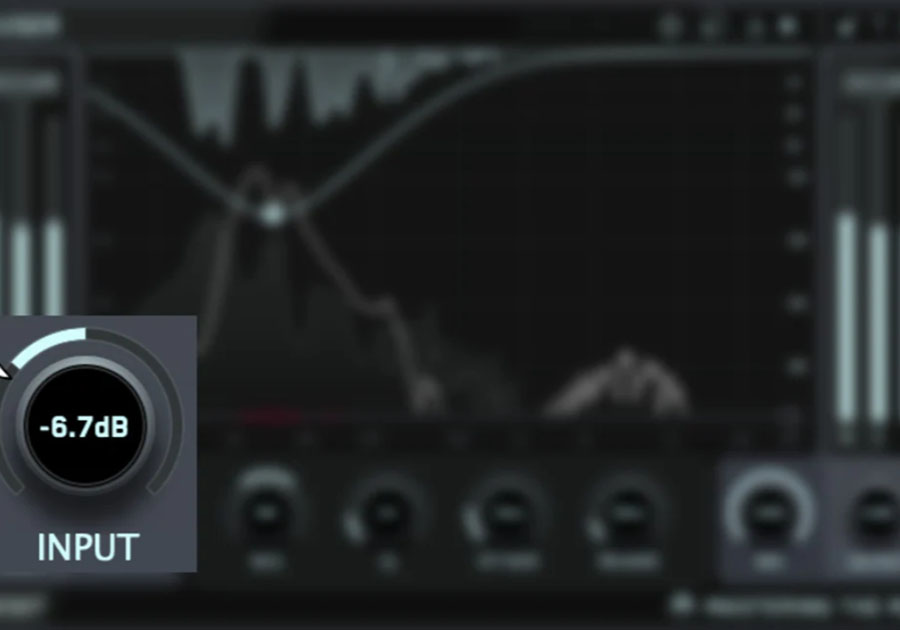
The input gain level match pointer shows the gain adjustments needed to match the perceived volume of your submissive channel to the side chained audio. This simple target helps you set a great relative volume balance, whether you want the submissive channel to be equally loud or slightly quieter than the dominant channel.
Resolve Conflicts
Click the 'Resolve Conflicts' button to automatically initiate processing that transparently resolves channel conflict and frequency masking without overdoing it.

Take Control
To manually create a node, double-click the frequency display. Drag the node down to increase the processing amount. Adjust mid/side, Q, attack, and release individually. Click the small triangle button (Δ) in the top right to listen to the Delta signal. It will assist you in setting the perfect attack and release settings.

Layering Like A Pro
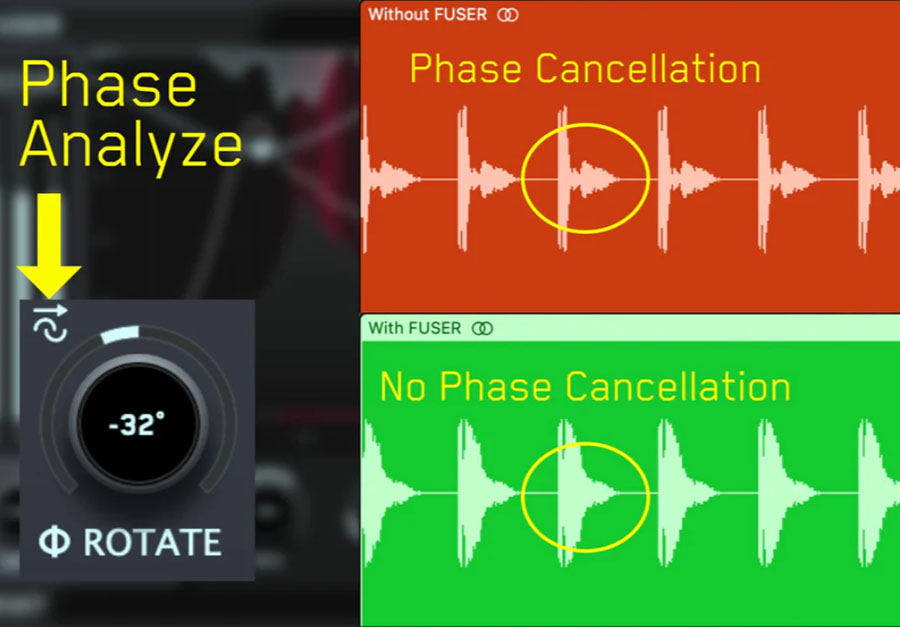
Need to reduce phase cancellation and make your layered sounds shine? FUSER has you covered. The innovative Phase Analyze feature automatically finds the optimal phase rotation ensuring minimal phase cancellation when layering similar sounds such as kicks and basses. Once you hear the breathtaking results, you’ll never layer sounds without FUSER again.
Clear Sound, Simplified: FUSER swiftly and transparently resolves conflicting audio sources for a defined mix.
Sonic Clarity Redefined: Conquer mix complexities with FUSER's multi-angle approach – volume balance, phase optimization, and smart side-chain ducking.
Intelligent Fixing: Experience effortless conflict resolution with FUSER's "Resolve Conflicts" feature – your personal mixing engineer in a plugin.
Elevate Every Element: From kick and bass balance to guitars and vocals, FUSER crafts space for standout sounds, ensuring your mix's focal point shines.
Effortless Start: Set up FUSER easily; resolve clashes by adding it as the final plugin in your chain, then sidechain your focal channel.
Visual Precision: FUSER's intuitive interface offers visual clarity through mid-side conflict hotspots, guiding you to make the best decisions.
Take Control: Dial in the ideal settings with manual node creation, fine-tuning parameters for a tight and controlled sound.
Perfect Layering: FUSER's Phase Analyze feature automatically identifies and sets the optimal phase rotation ensuring minimal phase cancellation when layering similar sounds such as kicks and basses.
Achieve Balance: The input gain level match pointer ensures impeccable relative volume balance, a crucial step for your mix's success.

4.5/5.0
(Average of 2 reviews)
Sort By: