Sign in to Loot Audio
Access your downloads, purchases and more
Access your downloads, purchases and more

Pulse is a revolutionary new downloader offering blazing fast speeds and powerful control over your libraries. Loot Audio uses Pulse to power some of our downloads and to make managing your libraries more efficient for you.
After your purchase we will send you a unique code (you will also find the code in your account). Use the code with Pulse to power your download and installation. More information about Pulse can be found here.
Included In:
What are Credits?
You earn Credits every time you purchase a product from Loot Audio. 3% of your order is added to your account in the form of Credits.
Use Credits for money off future orders or convert them to Sample Credits to download samples from the Sounds section of the site.
Deliver the best listening experience and release your music with confidence.

$80.00
Earn 177
Available in







• Integrated LUFS.
• Short Term LUFS.
• Decibels True Peak (16X Oversampling).
• Sample Peak.
• Left / Right heat map.
• Correlation heat map.
• Short Term Dynamic Range.
• Loudness Range.
Open the application and drag your audio onto the dashboard.

Select where your audio will be heard at the top, such as Spotify, Youtube, CD etc. Then select your tonal balance profile by loading a reference track or choosing from the presets.

The four sections give you detailed information about the loudness, peaks, stereo/phase information, and dynamic range of your audio. You can create a loop to see the readings of specific sections of your song.

If EXPOSE detects that issues would arise, the section icon will turn red. Click on the section icon to isolate the issues on the waveform to see the exact location of the issues. The analysis feedback will give you specific guidance to help you hit your technical goals, whether you’re aiming for a super-loud master, or trying to optimize your music to sound great on streaming sites.

Compare EQ shows how your average tonal balance compares to your imported reference track. Or you can select a genre-specific preset, all of which were created using sonic profiles from commercially successful tracks. Anything within ±3dB represents a very similar tonal balance. Anything greater than ±6dB would represent a considerable difference in tonal balance and you may wish to make adjustments.

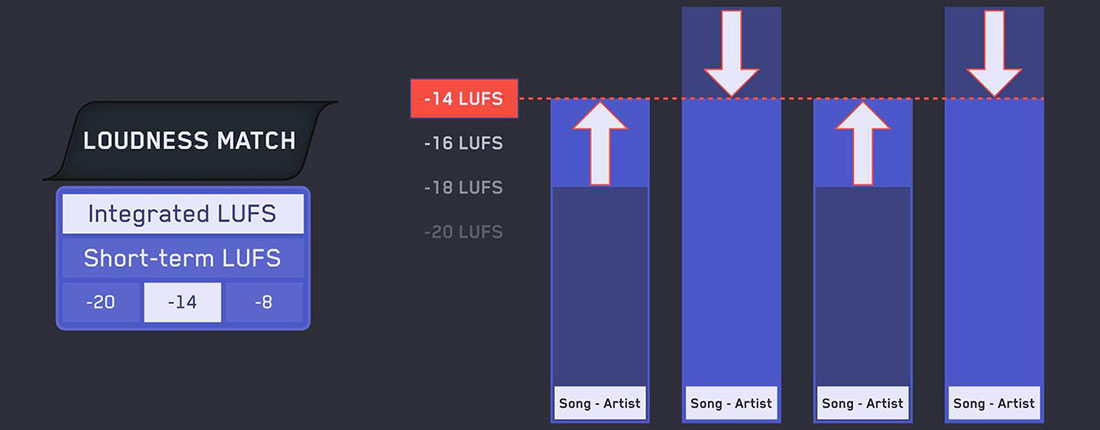
You can click the play icon or hit the spacebar to preview the audio. Click Loudness Match to normalize all audio to the same perceived volume for unbiased comparison.