🚨 Free product included with qualifying orders πŸš¨β˜…πŸš¨ Free product included with qualifying orders πŸš¨β˜…πŸš¨ Free product included with qualifying orders πŸš¨β˜…πŸš¨ Free product included with qualifying orders πŸš¨β˜…πŸš¨ Free product included with qualifying orders πŸš¨β˜…πŸš¨ Free product included with qualifying orders πŸš¨β˜…πŸš¨ Free product included with qualifying orders πŸš¨β˜…πŸš¨ Free product included with qualifying orders πŸš¨β˜…πŸš¨ Free product included with qualifying orders πŸš¨β˜…πŸš¨ Free product included with qualifying orders πŸš¨β˜…
Change country:
WISHLIST ABOUT BLOG SUPPORT CREDITS SAMPLE CREDITS CONTACT

Forthcoming Events

No forthcoming events scheduled.


Expired Events

Summer Sale Ended: 14 Jul 2026
May 2026 Deals Ended: 31 May 2026

Live Event

Active

Heatwave Sale 2026

Feel The Heat! From industry-leading plugins and Kontakt instruments to essential sample packs and cinematic sound design libraries.

Ends In
39d 20h 00m 59s
VIEW ALL DEALS

0

0

Change country:

We use cookies

We and selected 3rd parties use cookies or similar technologies as specified in our Cookie Policy

You can consent to the use of such technologies by using the "Accept" button

Manage cookies

Essential
Essential cookies required for business process and to make the website usable by enabling basic functions. (always active)
Marketing
Marketing cookies are used to serve personalised ads and analyse performance.

Plugin

Effects

$39.90

Earn 108

This product is also available as part of Mixing Mega Bundle

Outlaw
Outlaw
Outlaw
Outlaw

All Gain. No Pain

0

Plugin

Effects

$39.90

Earn 108

This product is also available as part of Mixing Mega Bundle

All Gain. No Pain

0

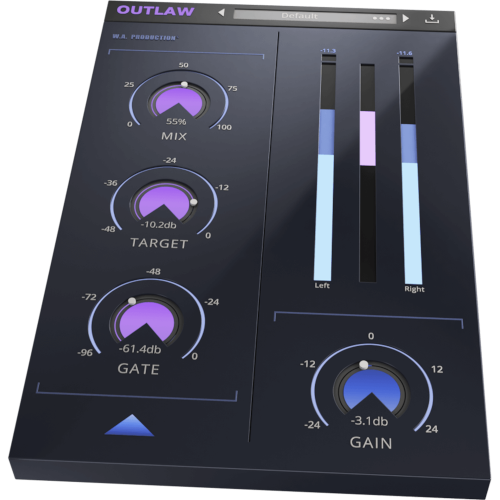
Whether you’re mixing live sound, smoothing vocals or balancing solo instruments, Outlaw is the gain-riding plugin you’ve been looking for. Outlaw listens to the incoming audio and compensates for volume changes, mimicking the mixing desk fader movement of a real-life audio engineer. Forget about drawing complex volume automation and let Outlaw do the hard work for you, with smooth gain levelling and a wealth of features.MIX, TARGET, GATE & GAIN These 4 main dials give you flexible control over the fundamental parameters of Outlaw, meaning that it’s easy to make broad-strokes adjustments to the performance of the plugin. Adjust the intensity of the effect with the MIX dial and set the RMS target level with the TARGET dial. Use the GATE control to set a relative level so that the gain-rider ignores softer sounds. The master output is controlled by the GAIN dial, very useful for setting accurate levels for precise A/B signal comparison.

Product Overview

Whether you’re mixing live sound, smoothing vocals or balancing solo instruments, Outlaw is the gain-riding plugin you’ve been looking for. Outlaw listens to the incoming audio and compensates for volume changes, mimicking the mixing desk fader movement of a real-life audio engineer. Forget about drawing complex volume automation and let Outlaw do the hard work for you, with smooth gain levelling and a wealth of features.MIX, TARGET, GATE & GAIN

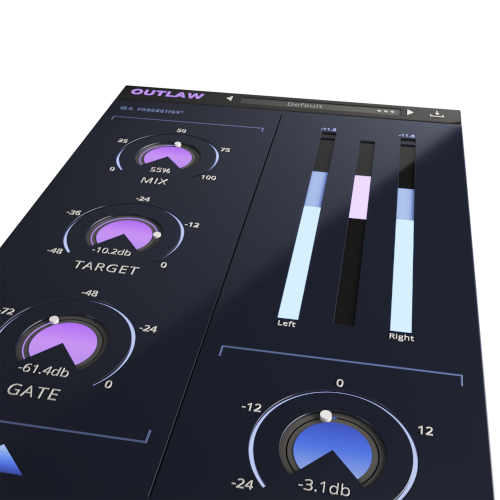
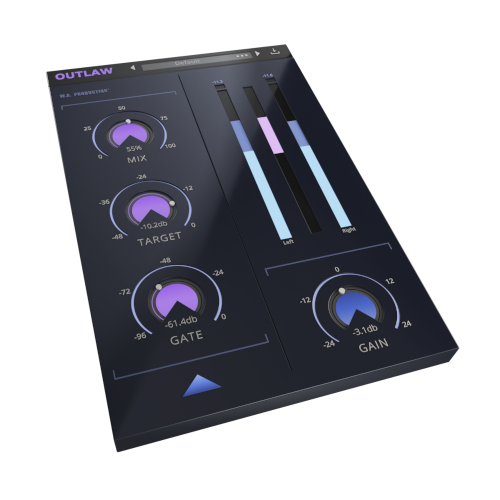
These 4 main dials give you flexible control over the fundamental parameters of Outlaw, meaning that it’s easy to make broad-strokes adjustments to the performance of the plugin. Adjust the intensity of the effect with the MIX dial and set the RMS target level with the TARGET dial. Use the GATE control to set a relative level so that the gain-rider ignores softer sounds. The master output is controlled by the GAIN dial, very useful for setting accurate levels for precise A/B signal comparison.

ADVANCED SETTINGS

Fine tune the gain algorithm with advanced settings, accessible from a secondary panel. Outlaw can perform in band-pass mode with high-pass and low-pass filters and 4 different slope settings. For example, this means you can perform effective gain-riding on audio with low rumble, high-hat bleed or other problematic frequency information.

The Attack and Release options let you mould the transients and sustains of the processed audio to create a smoother signal. The Direction parameter can be set to control the attack and release direction, operating upwards, downwards or in both directions.

Maximum values can be set to adjust the intensity of the gain-riding. A variety of RMS options determine how quickly Outlaw reacts to the incoming signal - another way to help smooth or sharpen the response.

VISUAL FEEDBACK

See exactly what Outlaw is doing to the signal at a glance, with the large visual feedback display. This displays Peak and RMS volume for both left and right channel, and the amount of gain-riding in the centre.

MADE FOR EVERYONE

Developed in the JUCE framework, this is our most stable plugin to date running happily in all plugin formats for Mac and PC with support for retina and high definition screens. For the first time, AAX / ProTools format is included so all producers using any system can enjoy this versatile plugin.

Outlaw is the kind of toolbox plugin that you’ll reach for every time you need to create balanced dynamics with a “human touch”. Make it the first plugin on your channel for live guitars, vocals, bass and drums, or anything that needs the smooth touch of a sympathetic virtual engineer.

FEATURES

  • MIX: mixes is the gain riding.
  • TARGET: sets the rms target of the gain-rider.
  • GATE: allows user to set a gate level that is relative to the TARGET level, to have the gain-rider ignore softer sounds.
  • HPF/LPF/SLOPE: Let you filter away the highs and lows in the detection signal with variable slopes so you can for example ignore the low rumble in a speech or vocal recording, or ignore the high attack and finger noises of a bass recording.
  • ATTACK/RELEASE/DIRECTION: Let you apply additional attack and release to the gain-riding so you can let through the signals peaks or smooth out the signals tails. With the DIRECTION control you can set the direction of the ATTACK and RELEASE which is helpful depending on if the general gain produced is upwards, downwards or goes in two directions.
  • MAX UP/MAX DOWN/INSTANT/ZERO/RMS: The MAX UP and MAX DOWN let you set the maximum gain that is applied up and down, which gives you more control over how extreme the gain-riding is allowed to be. Low values sound subtile. High values sound erratic. The RMS control lets you pick between slow, medium or fast rms-detection, which determines how quickly the plugin reacts to the incoming signal. INSTANT option is very fast and ZERO has 0ms RMS time.

Additional Information

Windows 8 or later (32/64bit)
Mac OS 10.15 or later
AAX - ProTools 11 or higher

Categories:

Effects

Formats:

Plugin

Tags:

Effects

Changelog

2.2.0

01/08/22

  • Resizability
  • Updated presets manager
  • Updated license management
  • Bug fixes

Discover More

View All Events

BROWSE ALL

Happening Now

View Heatwave Sale 2026

SHOP LIVE EVENT
Your Playlist CLEAR
Your playlist is currently empty. Visit a product page and add some tracks to your playlist
Audio Player

0:00
0:00