🚨 Free product included with qualifying orders 🚨🚨 Free product included with qualifying orders 🚨🚨 Free product included with qualifying orders 🚨🚨 Free product included with qualifying orders 🚨🚨 Free product included with qualifying orders 🚨🚨 Free product included with qualifying orders 🚨🚨 Free product included with qualifying orders 🚨🚨 Free product included with qualifying orders 🚨🚨 Free product included with qualifying orders 🚨🚨 Free product included with qualifying orders 🚨
Change country:
WISHLIST ABOUT BLOG SUPPORT CREDITS SAMPLE CREDITS CONTACT

Forthcoming Events

No forthcoming events scheduled.


Expired Events

Summer Sale Ended: 14 Jul 2026
May 2026 Deals Ended: 31 May 2026

Live Event

Active

Heatwave Sale 2026

Feel The Heat! From industry-leading plugins and Kontakt instruments to essential sample packs and cinematic sound design libraries.

Ends In
39d 20h 04m 51s
VIEW ALL DEALS

0

0

Change country:

We use cookies

We and selected 3rd parties use cookies or similar technologies as specified in our Cookie Policy

You can consent to the use of such technologies by using the "Accept" button

Manage cookies

Essential
Essential cookies required for business process and to make the website usable by enabling basic functions. (always active)
Marketing
Marketing cookies are used to serve personalised ads and analyse performance.

Plugin

Software

Waves

SuperRack Performer

$99.00

Earn 223

SuperRack Performer
SuperRack Performer
SuperRack Performer
SuperRack Performer
SuperRack Performer
SuperRack Performer
SuperRack Performer

Run Waves + any VST3 plugins in your live shows, natively on Mac & PC.

0

Plugin

Software

Waves

SuperRack Performer

$99.00

Earn 223

Run Waves + any VST3 plugins in your live shows, natively on Mac & PC.

0

Add Waves + any VST3 plugins to live setups of any size, any budget: All you need is a laptop. Get the exact live sound you want: All you need are Waves or ANY VST3 plugins running on a Mac or PC connected to the mixer (Core Audio / ASIO)—no extra hardware required. Insert your plugins of choice for the perfect vocal tuning & FX, tight and punchy drums, instant feedback elimination, even your favorite analog-modeled chain on the mix bus—and much more. You’ll no longer be held back by problematic gear and venues. Use your Waves plugins to solve room problems, make the show sound as polished as studio recordings, and empower your performers to sound great anywhere. Musicians: Take full control of your show – don’t compromise on your live setup, and give fans your studio sound on stage by using the exact plugin chains from your recordings. New! ProLink Console Remote Integration Protocol for DiGiCo Native Waves plugin host for live performances Runs ANY VST3 plugin on mac & PC Get top tier-sound at any show, of any size or budget Musicians: get your exact studio sound on stage Solve room problems with Waves’ specialized plugins USB sync with digital consoles; no additional cabling Run up to 64 stereo plugin racks App optimized & streamlined for live show use Stable & reliable for live shows with minimal latency Recall snapshots remotely using the Waves mRecall app Control multiple plugins at the same time Compatible with Dugan Speech – automatic real-time gain control for up to 64 mics Get Studio Sound on Stage. Simpler than Ever. Also available: SuperRack SoundGrid for advanced live mixing with the power of external DSP.

Product Overview

Add Waves + any VST3 plugins to live setups of any size, any budget: All you need is a laptop.

Get the exact live sound you want: All you need are Waves or ANY VST3 plugins running on a Mac or PC connected to the mixer (Core Audio / ASIO)—no extra hardware required.

Insert your plugins of choice for the perfect vocal tuning & FX, tight and punchy drums, instant feedback elimination, even your favorite analog-modeled chain on the mix bus—and much more.

You’ll no longer be held back by problematic gear and venues. Use your Waves plugins to solve room problems, make the show sound as polished as studio recordings, and empower your performers to sound great anywhere.

Musicians: Take full control of your show – don’t compromise on your live setup, and give fans your studio sound on stage by using the exact plugin chains from your recordings.

  • New! ProLink Console Remote Integration Protocol for DiGiCo
  • Native Waves plugin host for live performances
  • Runs ANY VST3 plugin on mac & PC
  • Get top tier-sound at any show, of any size or budget
  • Musicians: get your exact studio sound on stage
  • Solve room problems with Waves’ specialized plugins
  • USB sync with digital consoles; no additional cabling
  • Run up to 64 stereo plugin racks
  • App optimized & streamlined for live show use
  • Stable & reliable for live shows with minimal latency
  • Recall snapshots remotely using the Waves mRecall app
  • Control multiple plugins at the same time
  • Compatible with Dugan Speech – automatic real-time gain control for up to 64 mics

Get Studio Sound on Stage. Simpler than Ever.

Also available: SuperRack SoundGrid for advanced live mixing with the power of external DSP.

Get True Studio Sound on Stage

Today’s music not only embraces plugins, but often relies on them for the artist’s true signature. Integrating Waves and any other VST3 plugins into your live rig gives you total freedom over the sound you can conjure for the audience. Make your music sound true to its intention.

Simple to Set Up. Efficient to Mix.

SuperRack Performer is the natural extension of any mixing console, digital or analog. It’s optimized for simple setup and connectivity no matter the venue, and streamlined for live show use with efficient loading, routing, plugin control, quick keys, MIDI-use and snapshot recall.

Create Dream Processing Chains for Each Instrument

Don’t compromise on your live sound in the slightest. Use your favorite EQ, compression, analog saturation and modulation for the vocals and each instrument—the perfect tool for every job. Your FX chains can also be fully dialed in advance or explore our extensive library of presets on the fly.

Save & Recall Snapshots for Each Song

You don’t need to rely on static plugin settings for the whole show. Create and save perfectly dialed snapshots for each song in advance, and recall them as you perform them. You can even do this remotely using the Waves mRecall app.

Solve Venue Problems Automatically

Not every show is in Radio City Music Hall. Sometimes you’ll be mixing a gig in a small club, rooftop, church or multipurpose space with problematic acoustics and sub-par speakers. Waves’ specialty live plugins such as X-FDBK, PSE, F6 and the eMo series will easily handle these issues, so you can focus on creative mixing.

Run ANY VST3 Plugin

SuperRack Performer now lets you run ANY third-party VST3 plugin, in addition to Waves plugins, on a mac or PC. Optimize your performance with your favorite Waves and VST3 plugins to get your absolute best sound in any live show, no matter where it is.

Simple Remote Control App: MixMirror

MixMirror iPad app allows you to control plugins from anywhere in the venue. It’s a zero-hassle remote application that mirrors your mixer window and is tailored for the most practical and functional mixing experience possible.
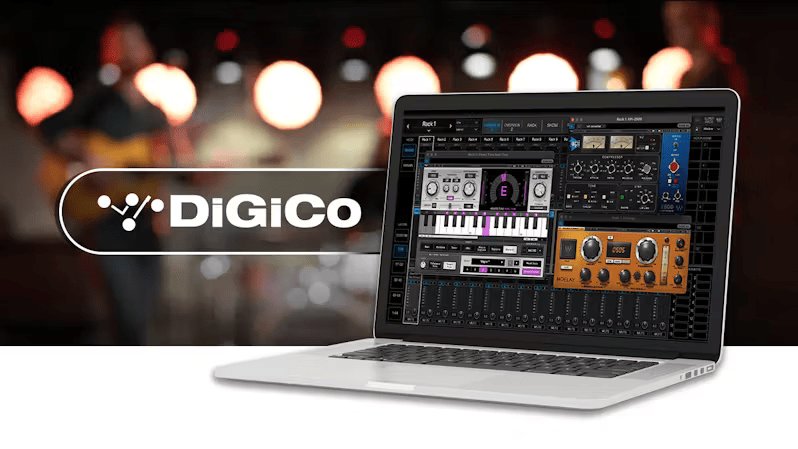
New! ProLink Integration for DiGiCo now available

ProLink is a completely redesigned, forward-thinking protocol for integration with DiGiCo systems. DiGiCo users will benefit from a faster, more powerful console integration of the SuperRack system that includes session and snapshot integration, plugin control and tempo control.

Additional Information

  • Mac
  • CPU
    Intel or Silicon Architecture
    Intel MacBook Air is not supported

    Memory
    Minimum: 8 GB RAM (16 GB recommended)
    16 GB free disk space on the system drive

    Operating System
    Catalina 10.15, Big Sur 11, Monterey 12, Ventura 13, Sonoma 14

    Screen Resolution
    Minimum: 1024x768
    Recommended: 1280x1024 / 1600x1024
    USB displays are not supported as the primary display.

  • Windows
  • CPU
    Intel Core i5, i7, i9, Xeon (all Gen 5 and above)
    AMD Quad Core

    Memory
    Minimum: 8 GB RAM (16 GB recommended)
    16 GB free disk space on the system drive

    Operating System
    Windows 10 64 bit
    Windows 11

    Screen Resolution
    Minimum: 1024x768
    Recommended: 1280x1024 / 1600x1024

SuperRack Performer supports any Core Audio (Mac) or ASIO (PC) audio device.

Important Notes:

  • Waves Plugins and applications are supported and tested on operating systems installed on the built-in system hard drive. Operating systems installed on external hard drives are not tested and may not be fully functional with our software.

Known Issues

For a list of all known issues, please click here.

Control Surfaces

Touch and Multi-Touch Screens

  • Supports up to four screens (requires 4-port graphic adapter).
  • Multi-touch support for Windows 10 and 11 only, with touchscreens supporting 10-point touch.

iOS & Android Apps

Touch and Multi-Touch Screens

  • MRecall

Sample Rate Support

44.1 kHz, 48 kHz, 88.2 kHz, 96 kHz

Supported Plugins

Technical Support & Sales

Contact Technical Support & Sales.

Categories:

Software

Formats:

Plugin

Tags:

Plugin VST

Discover More

View All Events

BROWSE ALL

Happening Now

View Heatwave Sale 2026

SHOP LIVE EVENT
Your Playlist CLEAR
Your playlist is currently empty. Visit a product page and add some tracks to your playlist
Audio Player

0:00
0:00