Theme

Forthcoming Events

No forthcoming events scheduled.


Expired Events

October Deals Ended: 31 Oct 2026
6th Birthday Sale Ended: 08 Oct 2026

Live Event

Active

Black Friday 2026

Our biggest sale of the year. Scoring for film, designing next-generation sounds, or mixing your next release? Explore deep discounts across thousands of premium plugins, virtual instruments, and sample libraries.

Ends In
10d 05h 57m 41s
VIEW ALL DEALS

0

0

Change country:

We use cookies

We and selected 3rd parties use cookies or similar technologies as specified in our Cookie Policy

You can consent to the use of such technologies by using the "Accept" button

Manage cookies

Essential
Essential cookies required for business process and to make the website usable by enabling basic functions. (always active)
Marketing
Marketing cookies are used to serve personalised ads and analyse performance.

Plugin

Plugin Effects

Yum Audio

Extractor

Easily Extract The Frequencies You Need

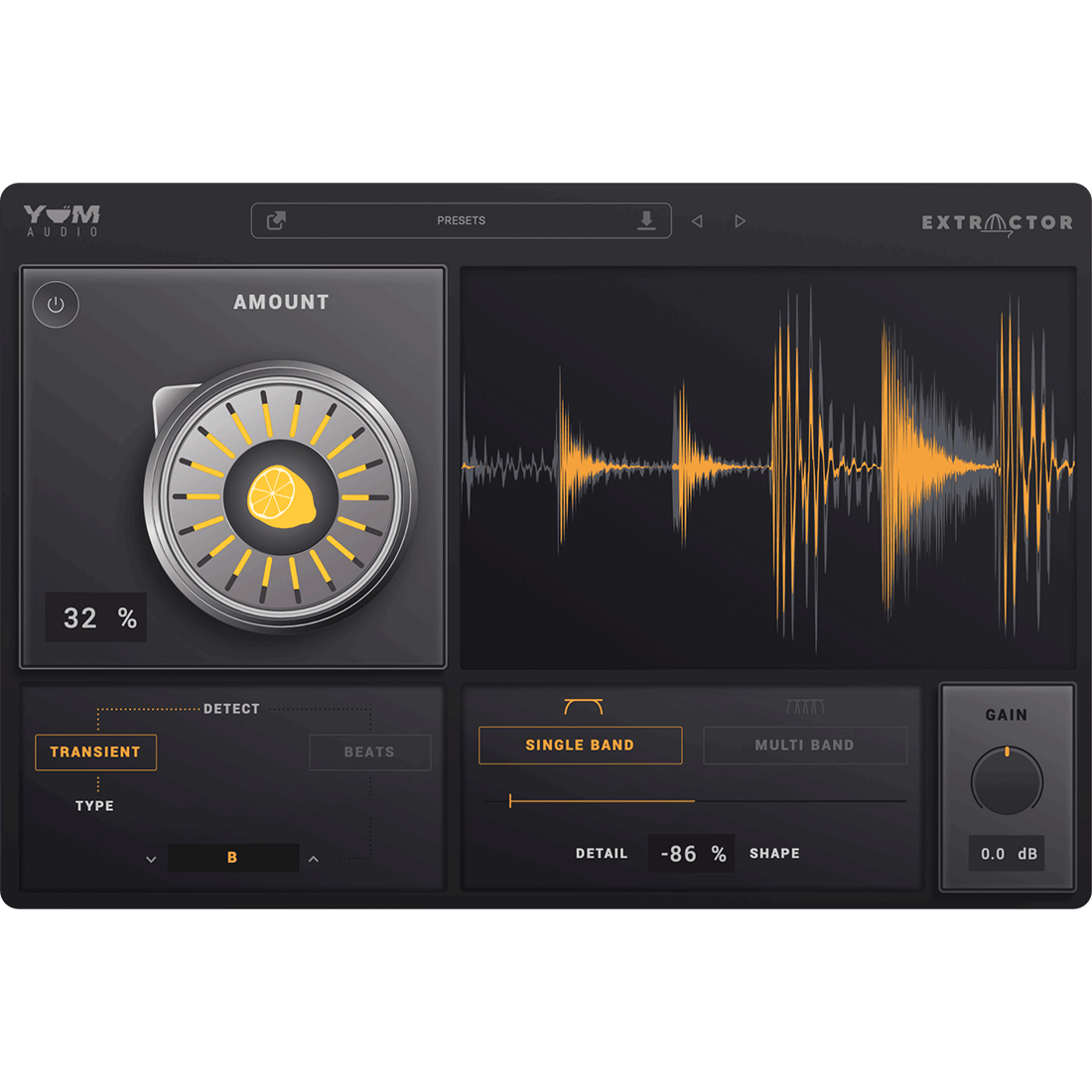
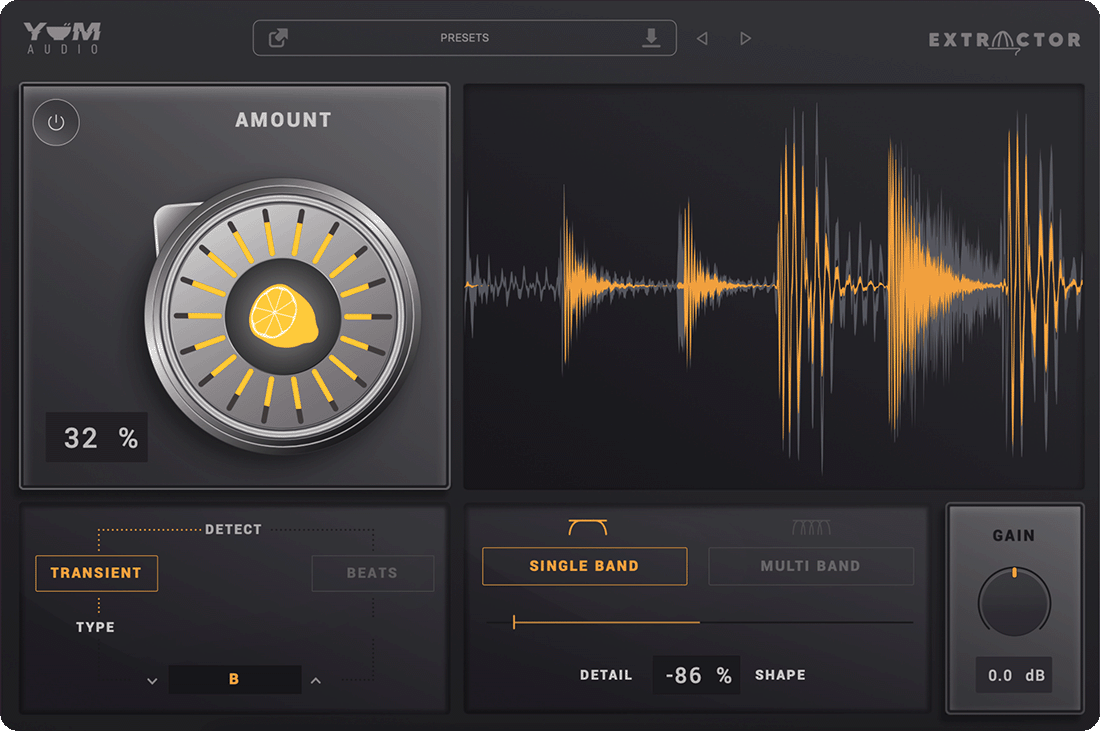
Yum Audio - Extractor - Main GUI
SAVE 60%
ENDS IN:

09

d

:

10

h

:

57

m

:

41

s

$23.60

$59.00

Save $35.40
★ Earn 55 Credits ($0.72 cashback)

0

SYSTEM & OS COMPATIBILITY
OS Support
macOS Win 10+
Plugin Formats ✓ VST3 • AU • AAX
Delivery Method ⚡ Manufacturer Serial
Disk Space 200 MB
🎁 Free Bonus Gift with £15+ orders: choose from Aura, Blox Reverb, DP-06+, Things: Flip EQ at checkout.

✓ Instant Digital Delivery
✓ Official Partner License
✓ Safe & Secure Checkout
✓ Dedicated Customer Support
Guaranteed Safe & Secure Checkout
Visa Mastercard American Express Apple Pay Google Pay Klarna
IN-DEPTH LOOK

Product Overview

Use Transient mode to extract specific hits or tighten up complex synth and percussive patterns. Use Beats mode to be time locked with your DAW and, for example, only keep the kick drum in an otherwise busy loop.

For both modes, choose between Single and Multi Band processing. Use Single Band processing for high and instant transparency. Use the Multi Band option for added intelligent frequency-based processing which extracts the shorter high end while keeping the longer bass frequencies intact.

The best part? Everything can be automated! This plugin is a secret weapon to supercharge your beat productions and mixes adding more intensity and variation to otherwise constant and stale loops.

CAPABILITIES & CONTENT

Key Features

  • Extraction control allowing you to extract sounds and tighten any loop
  • Accurate transient detection mode with sensitivity control
  • Transient mode to extract individual hits or even denoise loops
  • Time Sync “Beats” mode with 1/32,1/16,1/8,1/4,1/2,1/1 resolutions
  • Single Band mode for clear and accurate full band extraction
  • Multi Band mode for intelligent frequency-dependent extraction
  • High resolution visualizer to see waveform and extracted material layered together
  • All controls tuned by ear for instant and musical results
  • Yummy lemon-squeeze animation to squeeze any sound to your liking

OVERVIEW

extractor-gui

Toggle - Toggle between Extraction processing and Bypassed mode.

Amount - Squeeze any of your loops and extract samples full of definition. From 0% to 100%, move from subtle effects, to tight and controlled sounds, and finally into click and transient sound design territory. This control screams to be automated! Use automation on it to thin out loops in certain sections of your song and bring them back fully when increasing intensity. Doing this will be a game changer in your workflow.

Transient - In Transient mode, Extractor will perform its extraction based on all the transient material it detects in the incoming signal. This can work wonders on percussive and complex loops. Define the intensity of the plugin's reaction by using the added sensitivity slider.

Beats - In Beats Mode, Extractor will be in tight-locked sync with your DAW of choice. At 1/4, for example, an extraction will happen each quarter note. This can be a great setting to extract any kick drum sound from otherwise extremely busy and complex loops.

Display - Powerful wave form display giving you an instant point of reference when tweaking the plugin's controls. The unprocessing and incoming audio is a grey-coloured waveform while the overlayed yellow version shows you the extracted signal.

Single Band - Use the Single Band mode for an Extraction happening on the full frequency spectrum at once. The Detail control in Single Band is in “Shape” mode and controls the decay shape of the single band extraction. Tweak this to make the sound tighter or more open in its response.

Multi Band - Extractor uses the power of mulitband processing to smartly extract and tighten sounds troughout the frequency spectrum. For example, you can extract a kick drum with only a short click at the top end but a long bassy tone at the bottom end from an otherwise noisy and complex loop. The Detail control in Single Band is in “Frequency Bias” mode and controls how tightly the different frequency bands are decaying.

Gain - At the end of the signal path is an output gain control. Use it to set a final gain staging for the plugin to make it fit in perfectly in any of your FX chains and mixes.


SMART CO-PURCHASE UPSELL

Frequently Bought Together

Extractor
Extractor
$23.60 $59.00
Spread
Spread
$35.88 $69.00
Total for Both: $59.48
Extractor $23.60 $59.00

Discover More

View All Events

BROWSE ALL

Happening Now

View Black Friday 2026

SHOP LIVE EVENT
Your Playlist CLEAR
Your playlist is currently empty. Visit a product page and add some tracks to your playlist
Audio Player
0:00
0:00