Sign in to Loot Audio
Access your downloads, purchases and more
Access your downloads, purchases and more

Pulse is a revolutionary new downloader offering blazing fast speeds and powerful control over your libraries. Loot Audio uses Pulse to power some of our downloads and to make managing your libraries more efficient for you.
After your purchase we will send you a unique code (you will also find the code in your account). Use the code with Pulse to power your download and installation. More information about Pulse can be found here.
What are Credits?
You earn Credits every time you purchase a product from Loot Audio. 3% of your order is added to your account in the form of Credits.
Use Credits for money off future orders or convert them to Sample Credits to download samples from the Sounds section of the site.
Back in Time, Forward in Sound
$109.00
Earn 297







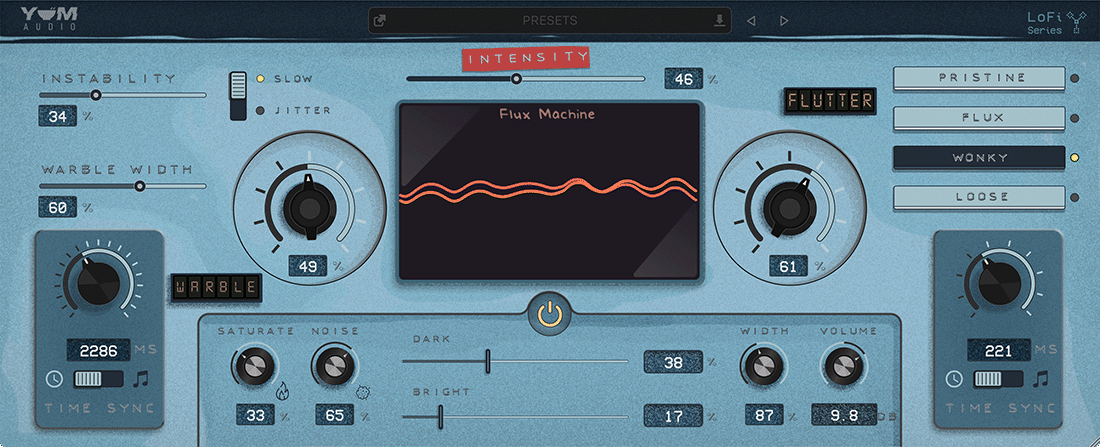
Instability - Warble Instability allows you to define how accurate or lofi the warbling should be.
Instability Type - Warble Instability Type allows you to define how the errors and fluctuations of the Instability main control behave.
Wrable - Warble makes the virtual tapes change very gradually and slowly in pitch and allows you to make signals more interesting or wider in a subtle way.
Warble Width - Warble Width is a very useful control when you want to push your signal into the stereo field. It gradually offsets the tape heads on the left and right channel.
Time - Warble Time allows you to set the overall time one cycle of the tape warbling takes. Depending on the mode this can be either set in milliseconds or synced to actual note values.
Intensity - The Intensity control sets the overall processing amount in the plugin and is a great way to automate all parameters at once, from a single source.
Flutter - Flutter makes the virtual tapes change very fast in pitch and allows you to create either a very subtle pitch instability or a very noticeable effect that can become a main characteristic of your sound.
Saturate - This control allows you to add a warm and crunchy modeled tape saturation to the incoming audio.
Noise - Noise gives you the Yum take on the classic audio effect. Instead of adding a constant noise loop to your signal, this effect actually generates noise based on your incoming audio signal. It will feel very natural, like some dust and grit on the tape interfering with your sound.
Color - These two controls are used to adjust the Brightness or Darkness of your signal. Both go from 0 to 100 percent and apply very smooth filters with a soft and natural fall-of, that are tweaked to get musical results.
Width - This control allows you to change the stereo width of your plugins output signal, using our proven algorithm from Spread Light.
Types - There are four, carefully crafted, flutter movement types included in flux machine. Each has been tweaked to add unique variation and movement to the sound