Sign in to Loot Audio
Access your downloads, purchases and more
Access your downloads, purchases and more

Pulse is a revolutionary new downloader offering blazing fast speeds and powerful control over your libraries. Loot Audio uses Pulse to power some of our downloads and to make managing your libraries more efficient for you.
After your purchase we will send you a unique code (you will also find the code in your account). Use the code with Pulse to power your download and installation. More information about Pulse can be found here.
What are Credits?
You earn Credits every time you purchase a product from Loot Audio. 3% of your order is added to your account in the form of Credits.
Use Credits for money off future orders or convert them to Sample Credits to download samples from the Sounds section of the site.
DAW for DJ Mixing

$149.00
Earn 447







Studio View
Export
Supported Libraries
Features
DJ.Studio gives you the power to make DJ mixes online - no controller or downloads required! You can DJ with Spotify, Beatport, and more from within this DJ app. All you need to mix music online is an internet connection and some creativity. Make DJ mixes with YouTube and share them with your friends in minutes!
DJ.Studio is a powerful DJ app that gives humble music lovers the ability to mix music and remix songs like professional DJs. This DJ software connects to your own music library (like Apple Music, Spotify, YouTube, rekordbox, Virtual DJ etc), enabling seamless mixing of your favorite music.
Whether you're a new DJ or a seasoned performer, DJ.Studio gives you access to pro features like transition editing, beatmatching, harmonic mixing, stem separation and sound effects - so you can mix up your favorite songs. This beats any free apps for DJing out there!
Through millions of calculations, Automix will optimize the order of your playlist based on tempo and harmonic matching. This saves you a huge amount of time and helps you achieve seamless transitions in your DJ mix. DJ.Studio gives you the opportunity to always deliver the perfect mix to your audience.
Grab your music from your library
The DJ.Studio desktop app integrates with your local music libraries, including rekordbox, Serato, VirtualDJ, Mixed In Key, Engine DJ, TRAKTOR, iTunes or simply your local file system.
Drag and drop single tracks or complete folders into your mix to get a full analysis of BPM, key and energy. DJ.Studio supports many file formats from MP3, WAV, AIFF, FLAC and more.
Integrations
DJ.Studio brings a new approach to DJ and production software by combining the two.

Integrated Track Analysis
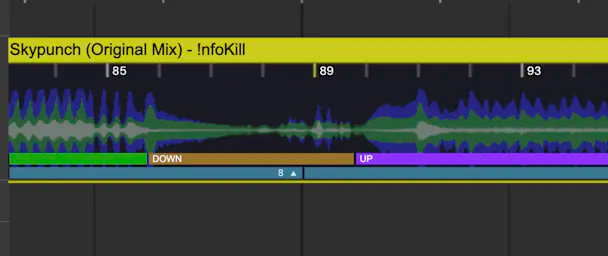
Detailed track analysis gives you everything you need to know about every track in your mix. Use Key, BPM, Phrases and Energy to understand the flow of your mix, and easily align tracks with the beatmap and visual graph. Spend more time on your transitions, and less on the nitty gritty.
Order your playlist
Decide if you prioritize matching tempo, key or both. Automix even allows you to choose which tracks you want to start or end your mix with. Set your own preferences for transition length, presets, and mix-in points. Automix will automatically beatsync tracks with different tempos.

Automix in Seconds
Automix compares millions of possible combinations and determines the optimal order for your playlist by comparing BPM and key compatibility.
By applying the wisdom of the harmonic wheel, Automix will do whatever it takes to suggest a mix sequence that will sound as seamless as possible.
Harmonic mixing done for you
The Automix algorithm uses the Camelot wheel by Mixed In Key and Harmonic mixing theory to help you get the best harmonic sounding transitions.
If the keys match, it's easier to get the perfect sound for your transitions.

Easy to Understand
By using colors and symbols that match the Camelot Wheel's transition best practices, it's easy to spot which tracks mix harmoniously, and which need some extra attention.
Improve your mixing skills while discovering new transition opportunities and incredible harmonic matches.

Solve Harmonic Issues
The Solver will help you fix any matching issue between tracks. Taking BPM and Key into account, the Solver will show you exactly which tracks can be added to fix a harmonic incompatibility.

Share your mix across various platforms and formats, effortlessly connecting with your audience. Export from basic MP3 to high-resolution 4K video or complete Ableton Live sets. DJ.Studio has all your needs covered.

Export To WAV or MP3
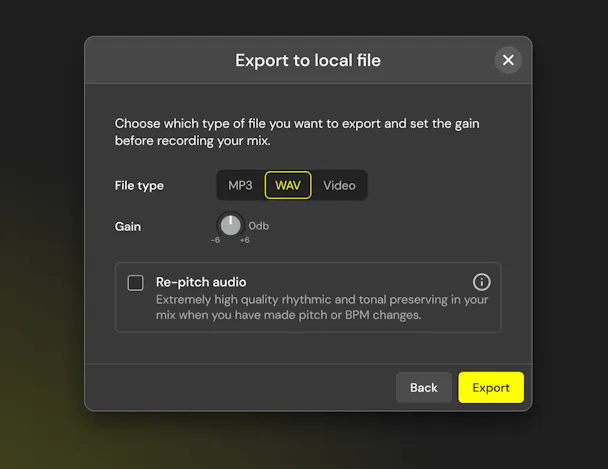
Swiftly render your mixes as MP3 or WAV, giving you the flexibility to choose between quality and storage space. Take command of volume output and enable Re-Pitch Audio Mode for cleaner mixes with fewer artifacts and higher quality, especially after tempo changes.
Export playlist
For live performances, export your playlist to an M3U file and seamlessly import it into your live software. Effortlessly impress your crowd with harmonic mixing and optimized track arrangements.

Export DJ set with Cue points
Craft the ideal order for your DJ set using the timeline editor, strategically placing transition markers. Export to rekordbox to generate a playlist with hot-cue markers at every mix-in and mix-out transition point. This provides a visual guide, ensuring you know precisely when and where to hit the play button for effortlessly seamless transitions.
Music Video for YouTube
Boost your YouTube channel by incorporating audio-reactive animations into your DJ mix and exporting it in various qualities, from SD to 4K.
The YouTube export feature also includes a tracklist ready for automatic track dividers, ensuring seamless segmentation for each song in your set.

Export to Ableton Live
Add a pro's touch to your DJ.Studio mix by exporting as an Ableton Live multitrack project.
The export includes all automation, transition, and effect details, allowing you to effortlessly recreate your entire DJ set in Ableton Live with just a click.
Whether you're a podcast producer, radio show host, or bedroom DJ looking to add extra detail—be it mastering, additional effects, or layering in more samples—DJ.Studio’s Ableton connection unlocks endless creative possibilities.

Mixcloud
Link your Mixcloud account to effortlessly upload, and share your latest mixes with your online audience. DJ.Studio goes the extra mile by automatically generating the tracklist and timestamp information, saving you valuable time and allowing you to focus more on your mixing.

Backup and Collaboration
Use the backup option to save a .DJS file for your project. Safely store it, share it with our support desk for assistance, or collaborate with other DJ.Studio users by sending them the file.

Enjoy comprehensive integration with Mixed In Key, rekordbox, Serato, VirtualDJ, Engine DJ, TRAKTOR, and iTunes in one seamless platform. Effortlessly discover tracks from your existing playlists, speeding up the incorporation of songs into your sets without the hassle of switching between software. Synchronize hot cues and phrases, allowing you to stay fully focused on your mix.
Edit your tracks
Unleash your creativity by customizing tracks—add loops, trim sections, shorten songs, and apply effects to give them your unique touch.

Sample Lane Editor
Elevate your mixes with additional samples, jingles, DJ tags, and effects.
Upload samples or generate them instantly from tracks. Easily extract any section of a song and include it in your global sample library. Apply effects, filters, EQ, and automation to samples independently of the two song channels, providing limitless creative freedom in your projects.

Combine presets, effects and custom automations simultaneously to create transitions with more complexity than is possible when mixing live. DJ.Studio provides powerful tools for blending tracks with an unprecedented amount of detail and expression.
After applying Automix, the tracks you've selected will already be mixed with transitions. Even without professional editing experience, you'll easily achieve professional-sounding transitions that sound much better than a stop-and-start or crossfaded playlist.
Want more? Get in deep with automation, allowing you to tweak your transitions in more detail than you can imagine.
Auto transitions
Speed up your workflow by using transition presets. Use a range of prepared transition presets that come with curves and styles for volume, equalizer and effects to find the most fitting transition between two tracks.
A slow volume crossfade, a fast mid blend, a gradual filter switch-up, or even an instant bass swap - any of these can be achieved at the click of a button.

Transition Customisation
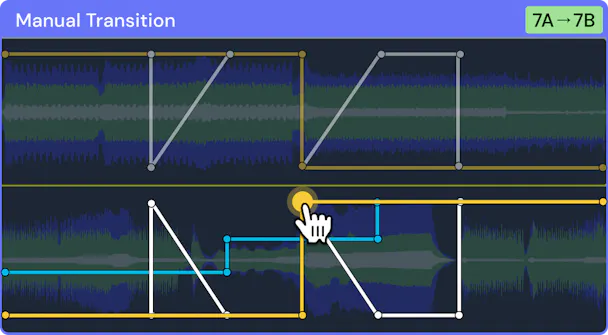
Customise transitions in a vast amount of detail using the timeline-based editor, and create any transition you can imagine.
Pick the length, intensity, and type of transition, then jump into the detailed automation point system for drawing custom transition lines for many parameters -however you want.
Customize transitions
Only got 2 hands? No problem, because DJ.Studio lets you mix like an octopus!
The transition editor lets you combine any of the effect types you want to - with any curve. Harness the transitional powers of volume, HPF/LPF filters, high/mid/low EQs, delay, reverb, looping, and more - all at the same time.
Lock finished work
Once you tuned a transition to perfection, lock the transition and move on to the next. No worries about accidentally losing the changes you've have made. By locking two tracks together, they will appear grouped in your playlist and move as one including their transition when you change the order of your tracks.

Unlock your full potential with DJ.Studio ‘Pro-Edition’, made for the more advanced DJs. This comprehensive suite of tools enables DJs to prepare and create mixes with masterful expression and an expanded set of features like automations, mastering and VST effects.
MAC
WINDOWS