Theme

Forthcoming Events

No forthcoming events scheduled.


Expired Events

October Deals Ended: 31 Oct 2026
6th Birthday Sale Ended: 08 Oct 2026

Live Event

Active

Black Friday 2026

Our biggest sale of the year. Scoring for film, designing next-generation sounds, or mixing your next release? Explore deep discounts across thousands of premium plugins, virtual instruments, and sample libraries.

Ends In
10d 05h 41m 20s
VIEW ALL DEALS

0

0

Change country:

We use cookies

We and selected 3rd parties use cookies or similar technologies as specified in our Cookie Policy

You can consent to the use of such technologies by using the "Accept" button

Manage cookies

Essential
Essential cookies required for business process and to make the website usable by enabling basic functions. (always active)
Marketing
Marketing cookies are used to serve personalised ads and analyse performance.

Intelligent EQ Plugin (VST / AU / AAX)

Mastering the Mix - Mixroom - Main GUI

$65.00

★ Earn 165 Credits ($2.16 cashback)

0

SYSTEM & OS COMPATIBILITY
OS Support
macOS Windows
Plugin Formats ✓ VST3 • AU • AAX
Delivery Method ⚡ Manufacturer Serial
🎁 Free Bonus Gift with £15+ orders: choose from Aura, Blox Reverb, DP-06+, Things: Flip EQ at checkout.

✓ Instant Digital Delivery
✓ Official Partner License
✓ Safe & Secure Checkout
✓ Dedicated Customer Support
Guaranteed Safe & Secure Checkout
Visa Mastercard American Express Apple Pay Google Pay Klarna
IN-DEPTH LOOK

Product Overview

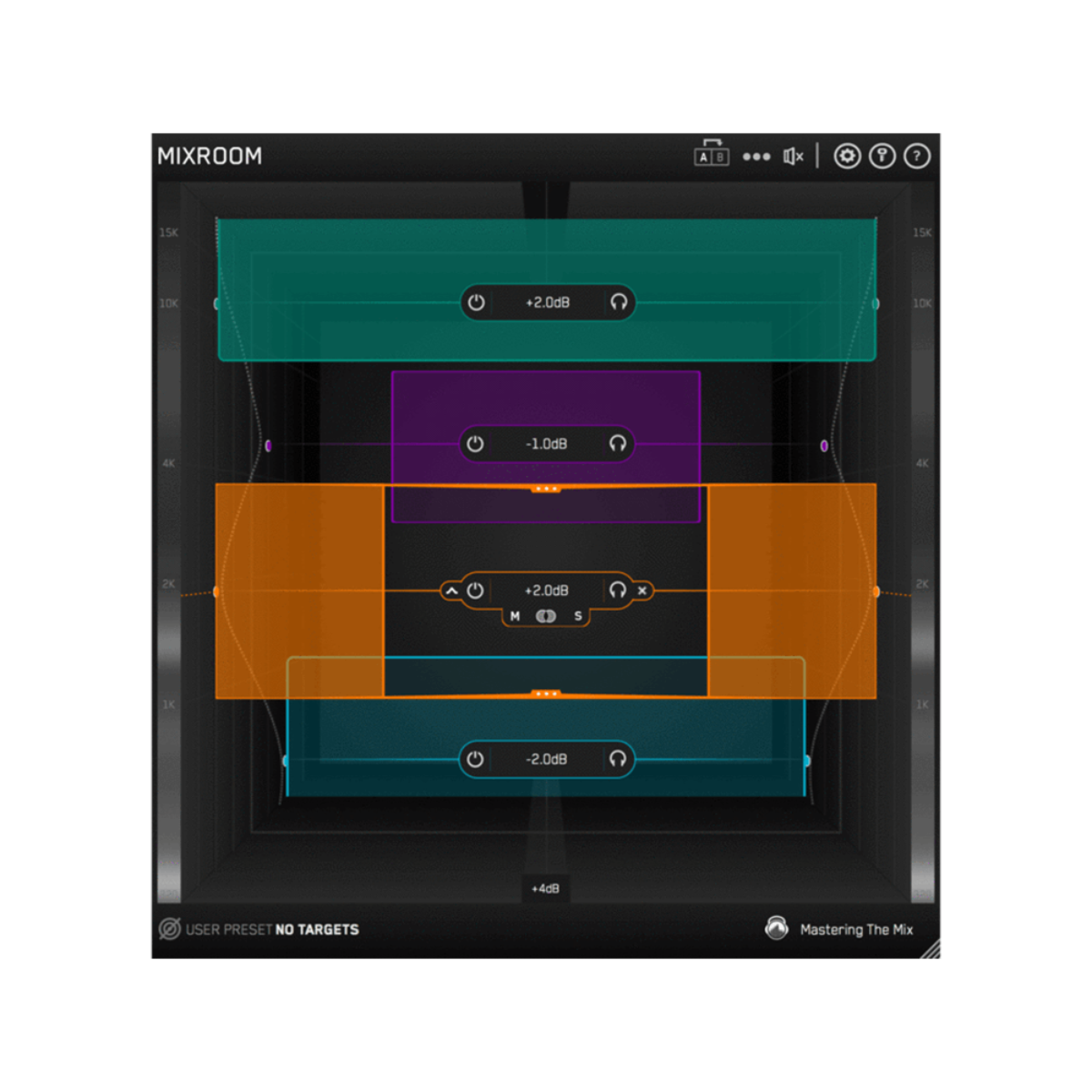
MIXROOM is an intelligent EQ that guides you to set the perfect balance of richness and clarity whether you’re working on a vocal, a synth or mastering your music.

MIXROOM analyses your audio and shows you which frequencies could be adjusted to improve your sound. The EQ target suggestion helps you get a solid starting point, from which you can tweak your sound to suit your preference.

HOW TO USE MIXROOM IN 4 SIMPLE STEPS

Step 1 mixing with MIXROOM

1. Load On Master or individual Channel
You can use MIXROOM to EQ anything in your session. It works great on vocals, instruments, grouped buses, or on your master channel.

Step 2 mixing with MIXROOM

2a. Choose A Preset
To get the most value from MIXROOM, start by selecting a preset that best suits the material you’re working on.

Step 2b mixing with MIXROOM

2b. Or Create A Target
You can create your own target values to help you get closer to the sound of your favorite tracks. Do this by clicking the target icon in the bottom left corner of MIXROOM and importing reference tracks.

Step 3 mixing with MIXROOM

3. Shape Your Sound
Now monitor a full bodied section of your audio. The Target EQ Curve takes out the guesswork and helps you dial in pro-sounding results in seconds. The ‘Add Smart Bands’ button will instantly load EQ bands that match the Target EQ Curve to give you a great starting point. MIXROOM’s unique and specifically designed EQ filters give you maximum clarity & transparency when shaping your audio.

Step 4 mixing with MIXROOM

4. Level Match
The EQ adjustments may have changed the perceived loudness of your audio making it difficult to hear whether the changes you’ve made are improving your sound. Match the gain slider to the level match pointer to match the perceived loudness of your audio before it passed through MIXROOM. This allows you subjectively hear how the changes have affected your sound.

Hear the difference mixing with MIXROOM

Hear The Difference!
Whether your audio is muddy, dull, thin, harsh, or even almost perfect, MIXROOM helps you elevate your mix to get the perfect balance of r


KEY BENEFITS

  • Specifically designed EQ filters that deliver maximum clarity & transparency in the mid and high frequency range.
  • Genre and channel specific EQ target suggestions to take out the guesswork and give you pro-sounding results in seconds.
  • Create your own EQ targets by importing reference tracks so you can get closer to the sound of your favorite tracks.
  • Level match pointer on output gain to help you make sure you're making real improvements to your music.
  • Super-fast workflow with easily adjustable EQ bands and mid-side functionality.
  • Clear and immersive mixing experience with the retina 3D & fully resizable user interface.

SPECIFICATIONS

MAC OSX Requirements
OS X 10.8 or higher. 64-bit AU, VST 2/3 or AAX host.

Windows Requirements
Windows 7, 8 or 10. 32-bit or 64-bit VST 2/3 or 64-bit AAX host.

SMART CO-PURCHASE UPSELL

Frequently Bought Together

Mixroom
Mixroom
$65.00
Bassroom
Bassroom
$40.00 $80.00
Total for Both: $105.00
Mixroom $65.00

Discover More

View All Events

BROWSE ALL

Happening Now

View Black Friday 2026

SHOP LIVE EVENT
Your Playlist CLEAR
Your playlist is currently empty. Visit a product page and add some tracks to your playlist
Audio Player
0:00
0:00