Sign in to Loot Audio
Access your downloads, purchases and more
Access your downloads, purchases and more

Pulse is a revolutionary new downloader offering blazing fast speeds and powerful control over your libraries. Loot Audio uses Pulse to power some of our downloads and to make managing your libraries more efficient for you.
After your purchase we will send you a unique code (you will also find the code in your account). Use the code with Pulse to power your download and installation. More information about Pulse can be found here.
What are Credits?
You earn Credits every time you purchase a product from Loot Audio. 3% of your order is added to your account in the form of Credits.
Use Credits for money off future orders or convert them to Sample Credits to download samples from the Sounds section of the site.
Get The Right Stereo Width.

$80.00
Earn 177







Smart Presets
STEREOVAULT analyzes your audio and suggests instrument (mix, music, bass, drums, vocals) and genre-specific stereo width settings across Focused, Balanced, Wide, and Super Wide options.
Level Match
After analysis, adjustments are loudness-compensated so users can hear the true stereo change rather than being influenced by a volume increase.
Reference Track Import
Users can import a reference track and STEREOVAULT will generate a width preset based on the stereo profile of that reference.
Stereo Visualiser
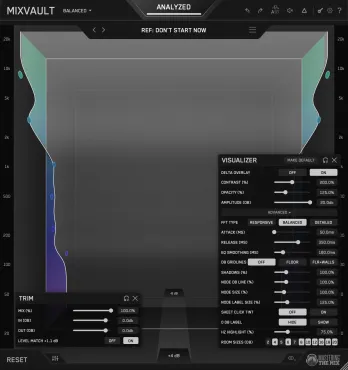
A real-time frequency-spectrum display shows what the stereo image is doing across the full range. The 2D view gives clear width feedback, while the 3D mode maps Mid and Side energy into a room-like view for more intuitive stereo placement. The display goes red to show frequency-specific phase warnings.
Transparent Mode
A mastering-grade workflow designed for clean stereo processing on full mixes and masters, using ultra-clean crossover filters and a shared band layout across tabs.
Flexible Mode
A more creative workflow that allows moveable bands per tab, making it ideal for mixing, sound design, and detailed stereo shaping on individual tracks and stems.
Six Processing Tabs
STEREOVAULT includes Spread, Creative, Panorama, Width, Rotate, and Clean, giving users a complete stereo toolkit rather than a single broad widening control.
Spread Tab
Includes Pristine for clean M/S-based widening, Diffuse for smooth allpass-based width, and Vintage for Orban-style pseudo-stereo width on mono or narrow material.
Creative Tab
Includes Stretch, Flux, Chorus, Haas, and Space for more characterful stereo movement, depth, and width effects.
Panorama Tab
Allows frequency-specific panning and stereo rebalancing, helping users place different parts of a sound across the stereo field with more precision.
Width Tab
Lets users redistribute Mid and Side energy using Blend and Balance modes, giving control over the centre and edges of the stereo image.
Rotate Tab
Repositions stereo energy within the field, either across the full signal, Mid only, or Side only, creating separation without traditional panning.
Clean Tab
Provides transparent Side EQ or Mid EQ, allowing users to boost or cut stereo energy per band while maintaining excellent mono compatibility.
Up To 6 Frequency Bands
The Band Editor and QuickSplit workflow make it fast to create up to six bands for independent stereo processing across the frequency spectrum.
STEREOVAULT was built around a simple idea: stereo width deserves the same level of care as EQ, compression, saturation, and limiting.
Producers often spend hours balancing tone and dynamics, then treat stereo as an afterthought by adding a broad widener across a sound or full mix. That can make the audio feel bigger at first, but it can also weaken the low end, blur the middle of the mix, create phase issues, and make the track translate poorly outside the studio.
STEREOVAULT helps solve that by making stereo shaping more intentional. The plugin starts by analyzing the audio and giving the user a smart starting point based on the source and genre. From there, the user can choose whether the sound should feel more focused, balanced, wide, or super wide. Instead of pushing everything outward, STEREOVAULT helps the user decide whether the audio needs to be widened, narrowed, cleaned up, or repositioned.
The plugin is designed to work across the full production process. On a master bus, Transparent Mode gives clean, precise stereo control with mastering-grade crossover filters. On individual tracks and stems, Flexible Mode gives more freedom for creative processing, allowing different band layouts across different tabs.
The six processing tabs give users a wide range of stereo tools in one interface. Spread handles clean stereo enhancement, Creative adds movement and spatial character, Panorama controls frequency-specific placement, Width manages the balance between Mid and Side energy, Rotate repositions stereo information in less conventional ways, and Clean provides transparent Mid or Side EQ for precise correction.
A key part of the plugin is Level Match. Wider or more processed sounds often feel better simply because they are louder. STEREOVAULT removes that bias by loudness-compensating adjustments after analysis, helping users make decisions based on the actual stereo change rather than the level change.
The real-time Stereo Visualiser gives immediate feedback on what is happening across the frequency spectrum. This helps users see whether the low end is staying focused, whether the top end is becoming too wide, and whether phase issues are being introduced. The 3D view makes stereo placement more intuitive by showing Mid energy closer and Side energy further away, creating a room-like visual map of the stereo field.
STEREOVAULT can also generate a preset from a reference track, allowing users to shape their stereo image towards the width profile of a professional release. This makes it easier to understand how wide a mix should feel in context, instead of relying purely on instinct or monitoring conditions.
The result is a stereo tool that is not just about making things bigger. It is about helping producers make the right stereo decision for the sound, the mix, and the final release.
Format: VST3, AU, AAX
Platforms: macOS, Windows